
Amazon is upgrading visual search in its Shopping app with eight discovery features that make product searches faster, more visual, and more specific, from real-time AI-generated search images to camera-based shopping through Amazon Lens.
TL;DR
- Amazon is expanding visual search to help shoppers find products faster using images, AI, and descriptive text.
- AI-generated search images now appear as shoppers type visual descriptions.
- “Shop by style” adds AI-created outfit collages to apparel searches.
- Lens Live scans real-world items and shows matching products instantly.
- Visual Suggestions help narrow broad searches while typing.
- Text can be added to image searches for more precise results.
- An iOS lock screen widget now opens Amazon Lens directly.
- “More like this” finds visually similar products from search results.
- Circle to search lets shoppers isolate specific items inside uploaded images.
Amazon Brings Real-Time AI Images Into Product Search
Amazon’s newest visual search update brings AI-generated images directly into the search bar experience in the Amazon Shopping app.
Instead of needing the exact product term, shoppers can type descriptive details such as color, texture, shape, or pattern, and see AI-generated images appear in the suggestions below the search bar. For example, someone looking for a shirt with a draped collar may not know the term “cowl neck,” while another shopper may describe a couch with woven side panels without knowing the word “rattan.”
As the user adds more words, the generated images shift in real time. Shoppers can then tap the image that best matches what they imagined and browse visually similar products. Amazon said the feature works best in categories where visual details matter, starting with apparel and home, with more categories expected over time.
Amazon Adds “Shop By Style” Collages For Outfit Discovery
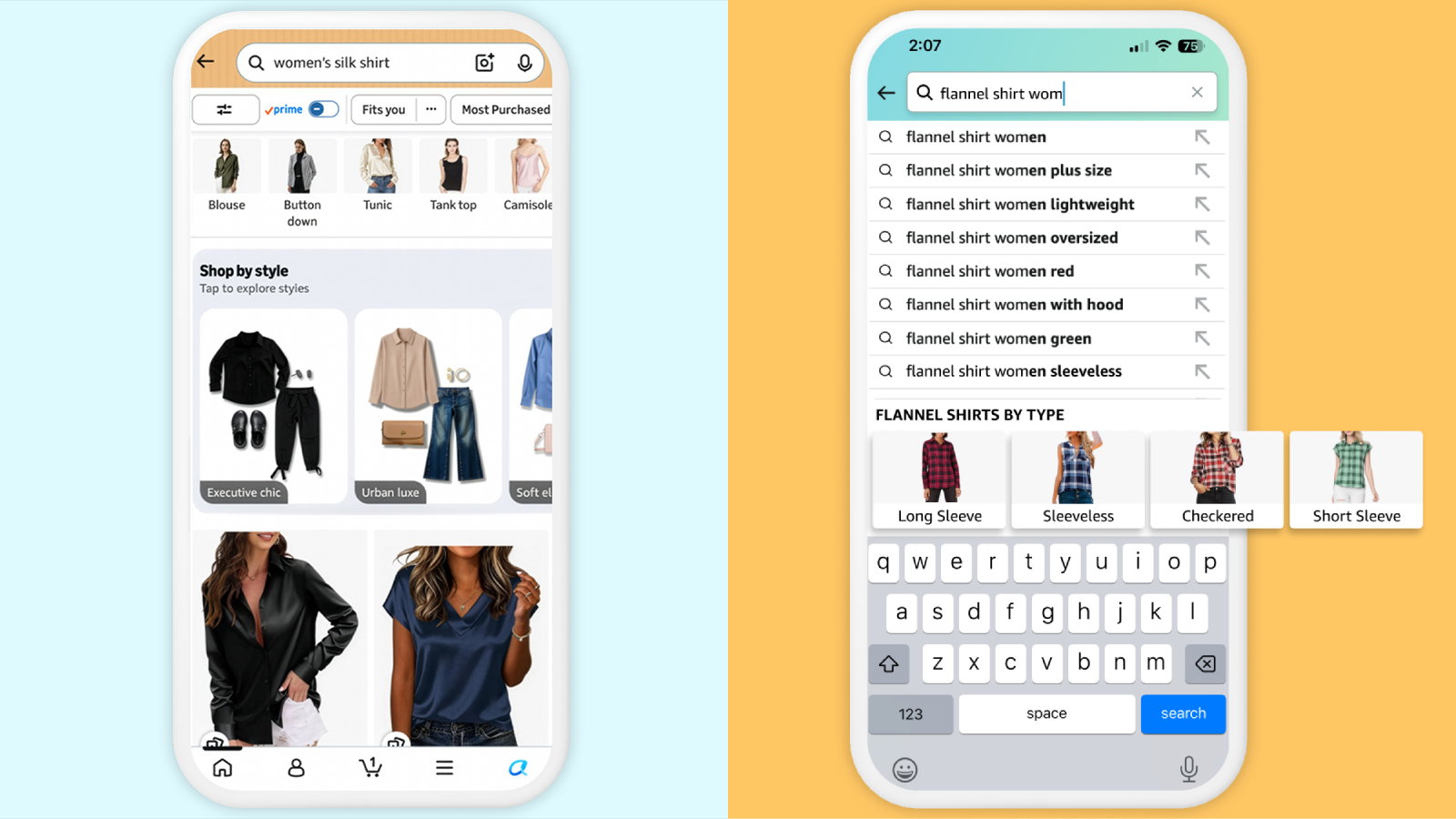
Amazon is also turning apparel search into a more curated experience with “Shop by style,” a feature that shows AI-generated shoppable collages in search results.
When customers search for apparel or accessories, such as “women’s silk shirt,” they may see collages organized by style themes such as “Urban luxe” or “Soft elegance.” Tapping one of these images opens a curated page where shoppers can browse items, explore similar products, or swipe through different looks.
Amazon Lens Live Makes Camera-Based Shopping Faster
Amazon Lens Live brings visual search into the camera view by scanning products instantly and showing top matching items in a swipeable carousel at the bottom of the screen.
Customers can compare options, add products to their cart, or save items to wish lists without leaving the camera experience. Amazon has also integrated Alexa for Shopping into Lens Live, allowing shoppers to view quick product summaries, explore suggested questions, and ask specific queries such as how to remove a coffee stain from a rug.
When the camera cannot identify an item, intelligent captions describe what is visible in the scene, giving customers a starting point for search.
Amazon Visual Suggestions Narrow Broad Searches While Typing
For searches that begin with broad visual terms, Amazon is adding Visual Suggestions to help customers refine results earlier in the process.
A search such as “flannel shirt” may surface descriptive visual filters while the customer is still typing. Shoppers can tap the image that best matches what they want, helping Amazon narrow the results to a more relevant product set before the search becomes too broad.
Amazon Lens Now Lets Shoppers Add Text To Image Searches
Amazon is also making image search more precise by letting customers add text to any image uploaded through Amazon Lens.
For instance, a shopper can upload a picture of a beige three-seat sofa and add a request such as “like this, but in white.” The search results then combine the original image with the added text instructions, helping shoppers specify brand, color, material, dimensions, or other preferences.
Amazon Lens Widget Turns The iPhone Lock Screen Into A Shopping Shortcut
Amazon Lens Camera Search can now be launched directly from the iOS lock screen through the Amazon Lens widget.
This lets customers search for products they see in the real world without first opening the Amazon Shopping app. Amazon said users can place the Lens widget alongside its Search and Orders widgets, creating a lock screen hub for camera search, text search, and order tracking.
Topics For More Insights
- Amazon Launches Alexa+ Podcasts With AI-Generated Hosts!
- Amazon Joins Netflix And Disney With TikTok-Like Clips On Prime Video To Help Users Find Shows Faster!
- Amazon, Meta And Smaller UPI Apps Push Back Against PhonePe, Google Pay Dominance In India
- Amazon Targets Mass Hiring With New AI Agents, Says Goal Is To “Humanize AI”
Amazon “More Like This” Speeds Up Visual Product Comparisons
Amazon’s “More like this” feature helps shoppers quickly find visually similar products from the search results page.
If a shopper likes a dress but wants a different length or sleeves, they can tap “More like this” on a product image and continue browsing similar options. It is designed for shoppers who know the look they want but need a faster way to adjust the details.
Amazon Circle To Search Refines Image Search Around One Item
Amazon is also adding a circle-based refinement tool for image search.
When customers upload an image to Amazon Lens, they can draw a circle around the item they want to search for. They can also resize or move bounding boxes to focus on a different item in the image, making the feature useful when one photo contains several searchable objects.
The bigger picture is simple: Amazon wants search to feel less like typing the perfect keyword and more like showing, describing, or circling what shoppers already have in mind.
