Artificial Intelligence
How Apple's New Siri AI Works And Why It Is More Than A Voice Assistant
Share
TL;DR
-
Apple’s new Siri AI uses Apple Intelligence to understand context, complete tasks, and work across apps more naturally.
-
The new Siri assistant can find information from messages, emails, photos, notes, and files without needing exact keywords.
-
New features like Visual Intelligence let Siri understand what users see through the camera, screenshots, and screen content.
-
Apple is focusing on privacy with on-device AI processing and Private Cloud Compute for more complex requests.
-
Apple Siri AI is rolling out gradually on supported Apple devices, with availability varying by device, language, and region.
Introduction
Some days, even simple things feel more scattered than they should. You remember you had to send a message, check something important, maybe make a note for later, and somehow all of it gets pushed around between work, errands, family updates, and the little things that keep popping up on your screen.
The funny part is that most of the information we need is already somewhere on our phone. It is not always lost, just separated or waiting for us to connect the dots.
That is why the next phase of digital assistants feels important. People no longer want a tool that only reacts to basic commands. They want technology that understands context, helps with everyday flow, and reduces the mental load. That is the larger change Apple is trying to bring with its new Siri AI.
So, what exactly is changing with Siri, and why is Apple treating this as more than a routine upgrade? Let’s break it down.
What Is Apple’s New Siri AI?
Launched at the Worldwide Developers Conference (WWDC) 2026, Apple’s new Siri AI is a redesigned version of Siri powered by Apple Intelligence. It is built to understand more natural language, follow context across conversations, and help users complete tasks across apps.
The old Siri mostly worked like a command system. You asked it to call someone, set a reminder, play a song, or check the weather. The new Siri AI feels more like an intelligent assistant that understands what you are doing, what is on your screen, and what information may be relevant from your apps.
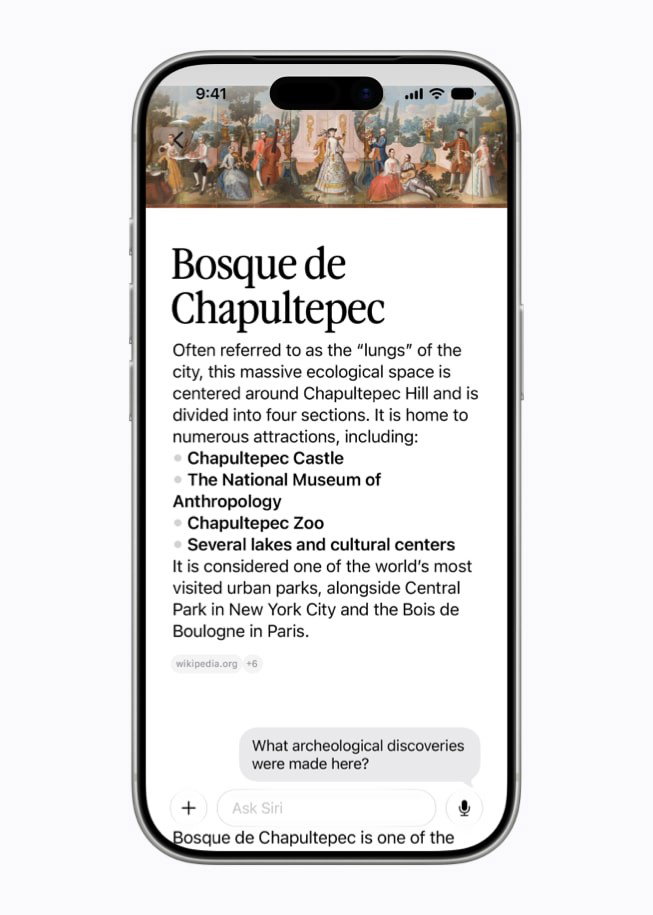
This means Siri can become more helpful in everyday situations. It may understand a message thread, help pull details from Mail, find a document, summarize content, or take an action without making you manually open five different apps.
Well, why is Apple making this change now? The answer has a lot to do with how quickly AI assistants are becoming part of everyday life.
Why Is Apple Reinventing Siri?
Apple is reinventing Siri because the way people think about AI assistants has changed. A few years ago, it was enough for a phone assistant to answer basic questions. Now, after tools like ChatGPT, Gemini, and Claude, people expect AI to understand longer requests, follow context, summarize information, write drafts, and help solve everyday problems.
That puts pressure on Siri. For years, Siri had the advantage of being built into Apple devices, but it did not always feel as smart or flexible as newer AI tools. Apple’s new Siri AI is an attempt to fix that gap without turning Siri into a separate chatbot app.
Apple’s approach is more about integration. Siri AI is meant to sit inside the Apple ecosystem and help across apps, files, messages, photos, calendar events, and screen content. In simple words, Apple wants Siri to be useful where your information already lives.
That is where the new Siri starts to feel different from the version people are used to.
How Does The New Siri AI Work?
The new Siri AI works through Apple Intelligence, Apple’s personal intelligence system for iPhone, iPad, and Mac. It helps Siri understand your request, find the right information, and take the next action to complete the task.
Some of this work happens directly on your device through on-device AI processing. That matters because Siri may need to understand personal information, such as your messages, emails, photos, notes, or calendar. Apple does not want every request to be sent away to the cloud by default.
For more complex tasks, Apple uses Private Cloud Compute. This is Apple’s way of bringing larger AI models into the experience while still keeping privacy at the center. Apple says personal data is not stored or made accessible to Apple when Private Cloud Compute handles a request.
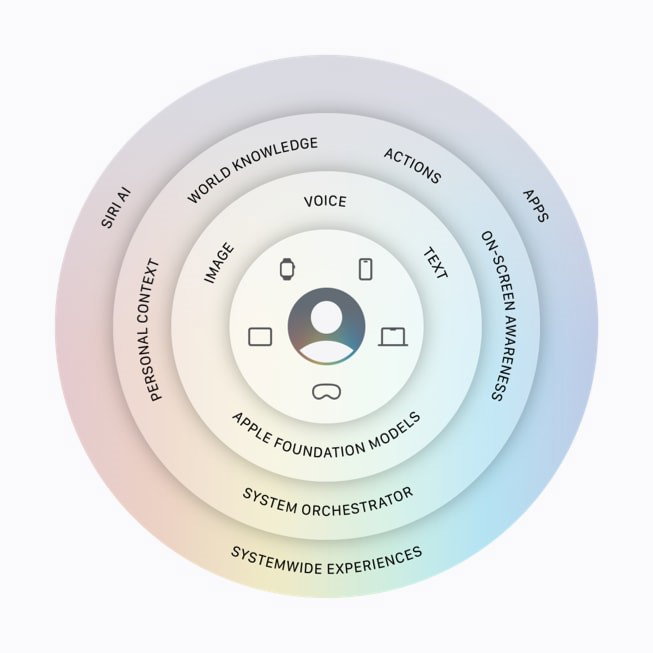
Behind the scenes, Siri AI can also use things like Spotlight and app actions to find information and complete tasks. You do not need to know all the technical details, but the result should feel simple: Siri understands more, finds things faster, and helps you do more without jumping between apps.
Technology matters, but most people will judge the new Siri by one simple thing, and that is whether Siri AI feels easier and more useful than before.
How New Siri AI Is Different From The Old Siri
The old Siri usually worked best when you gave it a clear, simple command. The new Siri AI is designed for messier, more human requests. Below are a few key factors that make new Siri different than the old one:
-
Better Context Awareness
With the older Siri, follow-up questions often felt hit or miss. New Siri AI is supposed to understand context better. You could ask about something, then continue with “add that to my calendar” or “send it to Karen,” and Siri should understand what you mean.
-
Natural Conversations Instead Of Command-Based Responses
This is a big one. People do not always speak in neat commands. We pause, correct ourselves, change our minds, and ask follow-up questions. Siri AI is built to handle that more naturally, so using it should feel less like operating a machine.
-
Personal Context Understanding
This is where Siri AI becomes more interesting. It can use personal context from your device to answer questions that are specific to you. For example, it could find a restaurant recommendation a friend sent in Messages, pull a hotel confirmation number from Mail, or bring up photos from a recent trip.
That is different from a general AI chatbot. ChatGPT or Gemini may be better for broad research or brainstorming, but Siri AI has the advantage of being closer to your personal device context. -
Perform Multi-Step Actions Across Apps
New Siri AI can also take action across apps. For example, it may help draft an email from scratch, edit and share a set of photos, or add something from a message into Notes. This is where Siri starts to feel less like a search box and more like a helper that can actually do things.
-
Search Personal Information More Intelligently
Most of us have had that “I know it is somewhere on my phone” moment. Maybe it is an old email, a screenshot, a message, or a note. Siri AI makes it easier to find. Instead of remembering the exact app or file name, you can ask in normal language, and Siri can search across your personal content to help you locate the information you're looking for faster.
-
Draft, Summarize, And Rewrite Content
Siri AI also brings stronger writing tools. It can help draft text, summarize content, rewrite something, or polish what you have already written. In Mail and Messages, Siri can also show how you usually write to different people, which makes the output feel less generic.
If the old Siri was mainly about answering questions, the new Siri is about helping users get things done.
What New Features Does Siri AI Bring?
Beyond smarter conversations, Apple is adding a few practical features that make Siri AI feel more complete. Here are the ones worth knowing:
-
Dedicated Siri App
The Siri app gives users a place to revisit past conversations and continue them across Apple products. So, you could start a conversation with Siri on Mac and later continue it on iPhone, iPad, Apple Watch, or Apple Vision Pro.
-
More Natural Voices And Better Dictation
On supported devices, Siri can sound more expressive, and users can adjust the pace and expressiveness of the voice. Dictation is also becoming more useful because it can better handle punctuation, capitalization, formatting, and natural speech.
-
AI-Powered Writing Assistance
Siri can help create drafts, proofread text, suggest improvements, and make changes based on what you ask. This can be useful in Mail, Messages, Notes, and even many third-party apps.
-
Smarter Experiences Across Apple Apps
Apple is also tying Siri AI into other Apple Intelligence features across apps like Photos, Safari, and Image Playground. So, the wider goal is not only to upgrade Siri, but to make Apple apps feel smarter everyday too.
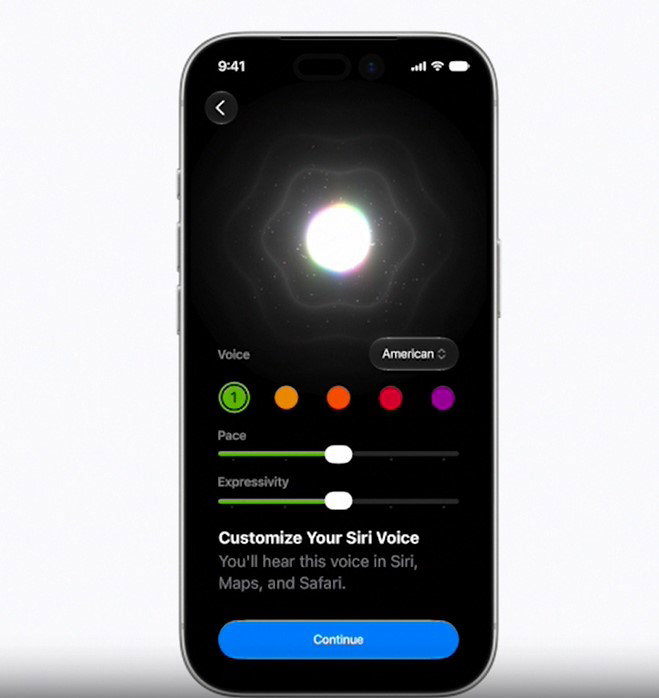
These features make Siri more useful when you speak or type to it. Well, Apple also wants Siri AI to understand what you are looking at, not just what you say.
What Is Visual Intelligence With Siri AI?
Visual Intelligence is one of the more interesting parts of Apple’s new Siri AI because it lets Siri understand what you are looking at, not just what you type or say.
-
Visual Intelligence On iPhone
On iPhone, Siri mode in the Camera app can let users point at something and ask questions about it. For example, Siri could help understand a plate of food, identify useful information, or take action based on what the camera sees.
-
Visual Intelligence On iPad And Mac
On iPad, Visual Intelligence can work through screenshots. On the other hand, Mac users can select something on the screen and ask Siri about it.
-
Visual Intelligence On Apple Vision Pro
On Apple Vision Pro, Siri can respond to what users are looking at in apps or in the physical space around them.
Visual Intelligence matters because a lot of our digital life is visual. Sometimes the answer is in an image, a document, a screenshot, a product label, or something sitting right in front of us. Visual Intelligence gives Siri another way to understand the situation.
It's easy to talk about what Siri AI can do. The more interesting part is seeing how those capabilities could fit into your daily routine.
Real-World Examples Of Apple’s New Siri In Action
The real test for Siri AI will be everyday use. Not the stage demos, but the small moments where it saves a few steps.
Say a friend texts you about a potluck. You could ask Siri what to bring, then have it add a recipe to Notes. If you are planning a trip, Siri could help find the hotel confirmation in Mail, a restaurant suggestion in Messages, and photos from your last visit.
If you are writing a work email, Siri could help draft it in your usual style. If you are searching for something you saved weeks ago, Siri could look across apps instead of making you dig manually.
Siri AI can also answer broader web-based questions. For example, you could ask when the next solar eclipse is happening or when a musician is coming to town, then continue with follow-up questions. That makes Siri more useful for both personal and general information.
A smarter Siri sounds great, but it also needs access to more of your information. That raises an important question. Can Apple deliver AI features without making the same privacy trade-offs as other AI assistants? Let’s find out.
Is Apple’s New Siri More Private Than ChatGPT And Gemini?
Apple’s privacy pitch is one of the biggest parts of Apple's Siri AI update. ChatGPT, Gemini, and Claude may still be better for long research, coding, brainstorming, or detailed writing. However, Apple wants Siri AI to stand out by being personal and private at the same time. Here's how Apple plans to do it.
-
On-Device AI Processing
Many Siri AI requests can run directly on the device. This is important because the assistant may need to use personal data from your messages, emails, photos, calendar, or files.
-
Private Cloud Compute
When a user requests more power, Apple can use Private Cloud Compute. Apple says this system is created so that personal data does not need to be stored or made accessible to Apple.
-
Data Privacy And Security Benefits
That privacy layer is important because Siri AI is being built around personal context. If users are going to trust Siri with information from their phone, Apple has to make privacy feel like part of the product, not just a promise in the background.
Of course, new features and privacy promise only matter once people can actually use them. The next thing many users want to know is when they can try it for themselves.
When Will Apple’s New Siri Be Available?
Apple’s new Siri AI will not arrive for everyone at the same time. The first stage starts with developer testing, which is available now across iOS 27, iPadOS 27, macOS 27, and visionOS 27. Apple says Siri AI will also come to a future watchOS 27 beta.
For regular users, the public beta is expected later this year. At launch, it will be available first on supported devices set to English. A wider rollout with more languages is expected after that, but Apple has not given a single global release date for every user, device, and region.
So, the simple answer is, developers get early access first, regular users get the beta later this year, and broader availability will depend on device support, language, and region.
So, who gets Siri AI first? The answer depends on both the device you're using and your location.
Which Devices And Regions Will Support Siri AI?
Siri AI will not come to every Apple device. According to Apple, support includes iPhone 16 models or later, iPhone 15 Pro, iPhone 15 Pro Max, iPad mini with A17 Pro, iPad models with M1 or later, Mac with M1 or later, Apple Vision Pro, Apple Watch Series 9 or later, Apple Watch Ultra 2 or later, and Apple Watch SE 3 when paired with a nearby Apple Intelligence-enabled iPhone.
There are also regional limits. Mac and Apple Vision Pro users in the EU will be able to access Siri AI when using a supported language. However, Siri AI will not be available at first in the EU on iOS, iPadOS, and watchOS. Apple also says Siri AI and other new Apple Intelligence features will not be available in China while it works through regulatory requirements.
On paper, Siri AI looks like Apple's most ambitious assistant yet. In practice, there are still a few hurdles standing between the vision and the reality.
Topics For More Insights:
Challenges Apple Still Needs To Solve
The promise is strong, but Apple still has to prove that Siri AI works well in normal life. Accuracy will matter a lot. If Siri misunderstands an email, adds the wrong date, or takes the wrong action, people may stop trusting it quickly.
Third-party app support is another big question. Siri AI becomes much more powerful when developers connect their apps with Apple’s App Intents and Spotlight. Without that, many useful actions may stay limited.

Then there is competition. ChatGPT, Gemini, and Claude are improving fast. Siri AI does not need to beat them at everything, but it does need to be genuinely useful inside Apple devices. That is where Apple has the best chance to stand apart.
What Does Apple’s New Siri AI Mean For The Future Of AI Assistants?
Apple’s new Siri assistant points to a future where AI assistants are not just apps you open when you need an answer. They become a layer across the device.
That could change how people use phones, tablets, and computers. Instead of opening one app to find details, another app to copy it, and a third app to act on it, users may simply ask the assistant to understand the context and help.
This is why Apple’s new Siri AI matters. It is not only about making Siri sound smarter, but it is also about making Siri more aware of your device, your apps, your screen, and your daily flow. If Apple gets the execution right, Siri could finally become a more useful, private, and genuinely personal AI assistant.
Final Thoughts
Siri’s real upgrade is not a bigger brain. Maybe it is finally learning how not to panic when the request has more than one step.
That is the part that makes Apple’s new Siri AI worth watching. Apple surely has the right ingredients, such as personal context, Visual Intelligence, app actions, Writing Tools, and Private Cloud Compute. However, ingredients are not dinner. Siri still has to prove it can serve the whole thing without dropping the plate.
If Apple gets that balance right, Siri AI may finally stop serving half-cooked answers and start bringing the full meal to the table!
Frequently Asked Questions
Does Siri AI use Apple Intelligence?
Yes, Siri AI uses Apple Intelligence. It is the AI system that powers many of Siri AI’s new capabilities. It also helps Siri understand context, work across apps, handle more natural conversations, and access personal information on your device while keeping privacy at the center of the experience.
Will Siri AI Work With Third-Party Apps?
Yes, Apple plans to extend Siri AI beyond its own apps. Developers can integrate App Intents, allowing Siri to perform actions in supported third-party apps. This could make it easier to complete tasks, find information, and automate workflows using natural language commands.
Which Devices Support Siri AI?
Siri AI is available only on supported Apple Intelligence devices. These include iPhone 15 Pro models and newer, select iPads and Macs with Apple Silicon, Apple Vision Pro, and compatible Apple Watch models. Availability may also vary depending on language support and region.
Is Siri AI Coming To iPhone 17?
Yes, Siri AI is expected to come to iPhone 17. Since iPhone 17 supports Apple Intelligence, users should get access to Siri AI features. However, some advanced Siri AI features may be limited to iPhone 17 Pro models and iPhone Air.
Tue, Jun 23, 2026

Enjoyed what you've read so far? Great news - there's more to explore!
Stay up to date with the latest news, a vast collection of tech articles including introductory guides, product reviews, trends and more, thought-provoking interviews, hottest AI blogs and entertaining tech memes.
Plus, get access to branded insights such as informative white papers, intriguing case studies, in-depth reports, enlightening videos and exciting events and webinars from industry-leading global brands.
Dive into TechDogs' treasure trove today and Know Your World of technology!
Disclaimer - Reference to any specific product, software or entity does not constitute an endorsement or recommendation by TechDogs nor should any data or content published be relied upon. The views expressed by TechDogs' members and guests are their own and their appearance on our site does not imply an endorsement of them or any entity they represent. Views and opinions expressed by TechDogs' Authors are those of the Authors and do not necessarily reflect the view of TechDogs or any of its officials. While we aim to provide valuable and helpful information, some content on TechDogs' site may not have been thoroughly reviewed for every detail or aspect. We encourage users to verify any information independently where necessary.
Loading comments...