
Artificial Intelligence
Everything You Need To Know About OpenAI's Codex
Share
Overview
Coding!
Not just coding but also reviewing and making changes. Don’t make us start talking about Agile cycles already.
In the AI era, you can deploy your software in seconds, spin up environments instantly, crush hackathons, maintain GitHub streaks, and blitz through LeetCode. You can even make a movie in seconds, but coding has come a long way.
You see, traditional development was powerful but painful: searching documents, fixing cryptic errors, repeating boilerplate, juggling tabs, and rewriting logic you’ve built a dozen times.
Today? There is AI, and it has changed the narration.
To give this momentum, OpenAI has introduced OpenAI Codex.
What is it? How powerful is it?
We are going to discuss everything. So, dive in and get ready to code with AI because no one’s going to hate coding anymore.
AI coding is changing the way developers write code, and OpenAI’s Codex is one of the first true AI systems built to understand, generate, and refine code the way developers actually think.
Instead of relying on rigid rules or pattern-matching shortcuts, Codex interprets intent from natural language and translates it into functional code across multiple languages and frameworks. That means faster prototyping, smoother debugging, and a development workflow that feels less like manual assembly and more like an intelligent collaboration.
In this article, we break down everything you need to know about OpenAI’s Codex and how it’s reshaping modern development.
Starting with Codex itself.
What Is OpenAI Codex?
OpenAI Codex is an AI-powered software engineering agent built to help developers move faster and code smarter. Instead of acting like a simple autocomplete tool, Codex can actually write, modify, optimize, and even run code, whether you’re working inside a cloud environment, your Integrated Development Environment (IDE), or straight from the Command Line Interface (CLI).
Powered by a coding-tuned version of GPT-5, it can step in to handle everything from fixing stubborn bugs to generating new features, refactoring messy logic, or running tests on the fly. It can also refactor existing code, complete functions, fix errors, suggest improvements, and even explain logic in plain English.
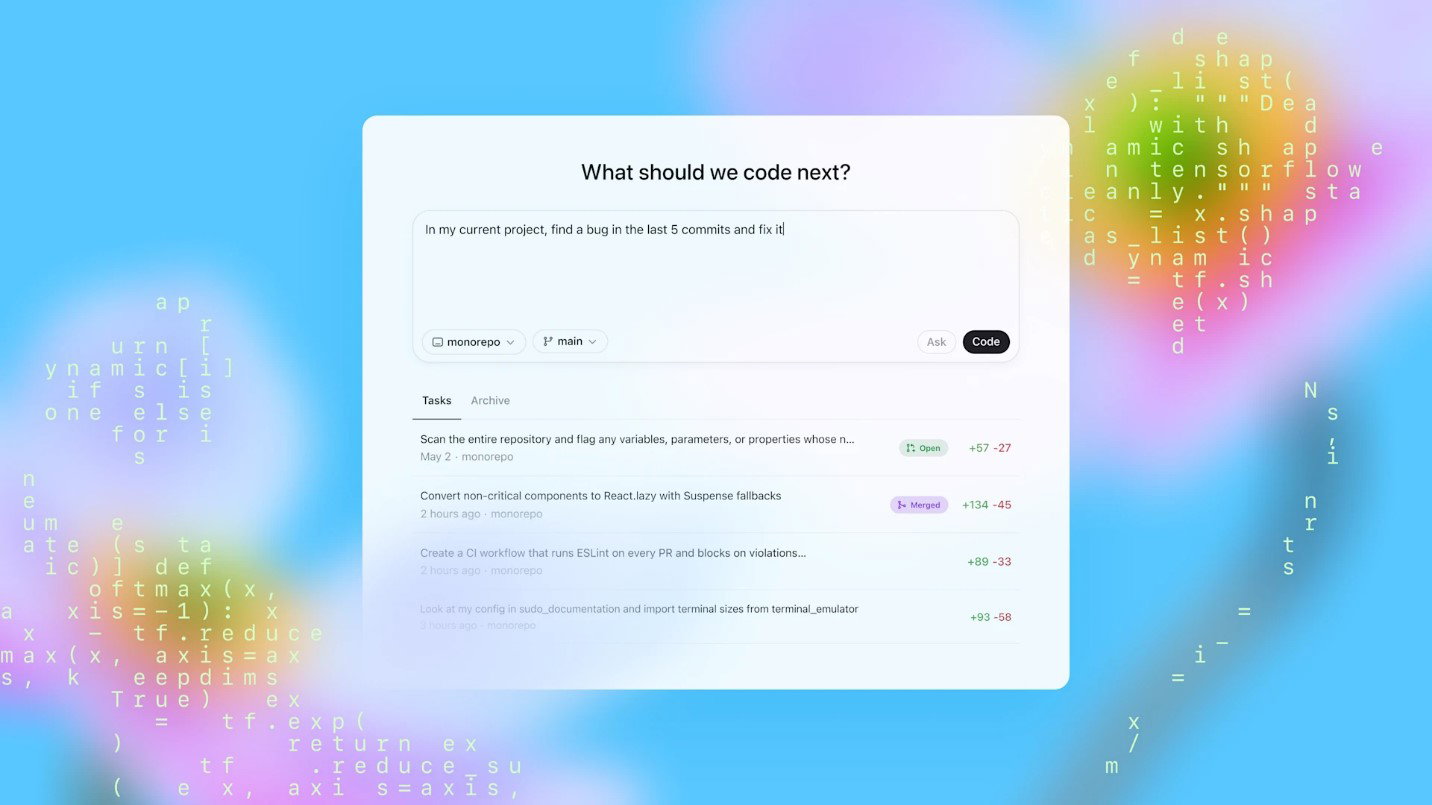
So, whether you’re building an API endpoint, writing tests, cleaning up a messy function, or experimenting with a new framework, Codex bridges the gap between thinking and coding.
With that in mind, you may wonder how it works. To answer that, let’s have a look at what’s under its hood.
How Does OpenAI Codex Work?
Codex doesn’t run like a traditional code generator but works more like an autonomous engineering agent that thinks in steps. When you give instructions, it breaks down your request into a plan, evaluates the context of your project, and chooses the best way to execute it.
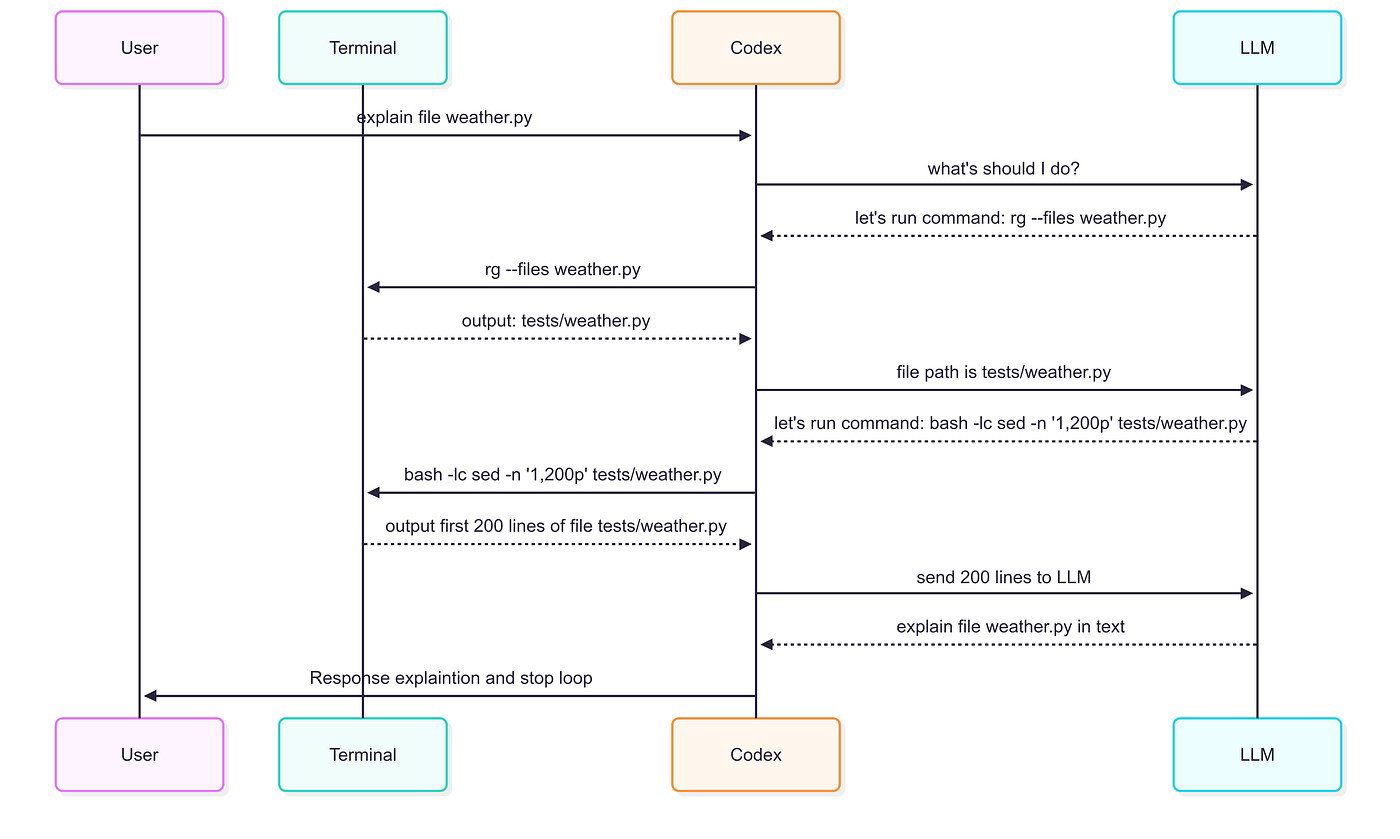
Here’s a step-by-step process explained.
Step 1: Understanding Full Context First
Generally, Codex reads the files you provide. Your functions, folder structure, comments, dependencies, and even naming conventions. Then it processes surface-level patterns by building a mental map of:
-
What does your codebase do?
-
Where does your request fit?
-
How to adapt to your specific architecture?
This means Codex will align with your existing design decisions itself. Such a relief!
Step 2: Translating Natural Language Into Code Logic
The next step is when you describe what you want, by stating prompts, like:
-
“Add input validation for this API.”
-
“Break this function into smaller parts.”
-
“Write a test suite for the login flow.”
Once done, Codex processes the intent behind your words and converts it into structured logic. So, instead of you typing function signatures and boilerplate, Codex handles the scaffolding while you stay focused on logic and edge cases.
Step 3: Generating Code With Multi-Step Reasoning
Unlike older models that write code line by line, Codex plans holistically. Thus, it can:
-
Reason about multi-file dependencies.
-
Decide how large changes should be structured.
-
Generate code that fits neatly into your project’s conventions.
This is why it is perfect for larger tasks, such as feature additions or refactors.
Step 4: Running, Testing And Executing
Here’s where it behaves like a genuine engineering teammate. Codex can:
-
Run the code in a sandboxed environment.
-
Observe errors or test failures.
-
Fix them automatically.
This feedback loop gives Codex a “debug and improve” cycle, making its output more reliable and production friendly.
Step 5: Integrating Across Cloud, IDEs, And CLI
Now, whether you’re building via VS Code, a JetBrains IDE, GitHub Codespaces, or your terminal, Codex integrates directly into your flow.
This flexibility lets developers use Codex as:
-
A brainstorming partner
-
A refactoring engine
-
A debugging bot
-
A hands-on executor for test runs and quick Proof of Concepts (PoCs)
In short, Codex works by combining language understanding, code awareness, multi-step reasoning, and executable feedback loops, giving developers accuracy and clarity in their workflow.
Now that you know how Codex thinks and executes tasks, let’s look at what that actually translates to in your day-to-day development workflow.
Core Capabilities And Features Of Codex
Codex is designed to eliminate the slow, repetitive, and mentally draining tasks that developers face daily. Its power shows not in theory, but in the practical, high-impact capabilities developers use constantly.
Here’s a quick look at the features:
-
Rapid Feature Prototyping
When you want to test an idea or spin up a quick feature, Codex can generate initial scaffolding in seconds, including routes & endpoints, UI components, database schemas, and helper functions. This lets developers validate ideas without sinking time into setup.
-
Smart Boilerplate Handling
The repetitive stuff, CRUD logic (Create, Read, Update, Delete), validation blocks, and error-handling wrappers are handled instantly. Instead of writing yet another controller or pagination block, Codex generates it while you fine-tune the logic that actually matters.
-
Speedy Bug Fixes And Error Resolution
Codex can scan failing code, locate the issue, and propose accurate fixes. It can solve typical debugging tasks like resolving type mismatches, fixing syntax issues, correcting faulty logic, and patching edge cases. These problems are handled with significantly less back-and-forth.
-
Complete Test Generation
Software testing is essential but time-consuming. Codex can help with generating unit tests, integration tests, mocks & stubs, and regression test cases. So, for teams focused on coverage and reliability, this eliminates a lot of manual work.
-
Code Cleanup And Refactoring
Instead of spending hours refactoring old code, Codex helps split large functions, rename variables meaningfully, improve readability, reorganize files, and remove duplication. This process keeps the codebase healthy without slowing down new developments.
-
Clear Code Explanations
Codex can explain unfamiliar code in plain English—helping developers quickly understand legacy logic, 3rd-party snippets, or complex flows. This makes onboarding dramatically easier.
-
Multi-Programming Language Support
Codex adapts to wherever you work—Python, TypeScript, Go, Java, C#, SQL, and more. This flexibility adds value across backend systems, APIs, scripts, automations, and full-stack projects.
By compiling all these features into this AI agent, the goal is to help developers remove coding friction so they can move faster, stay focused longer, and spend more time solving problems rather than wrestling with repetitive coding tasks.
In fact, Stack Overflow states that ChatGPT is the primary code assistant tool that professionals use regularly.
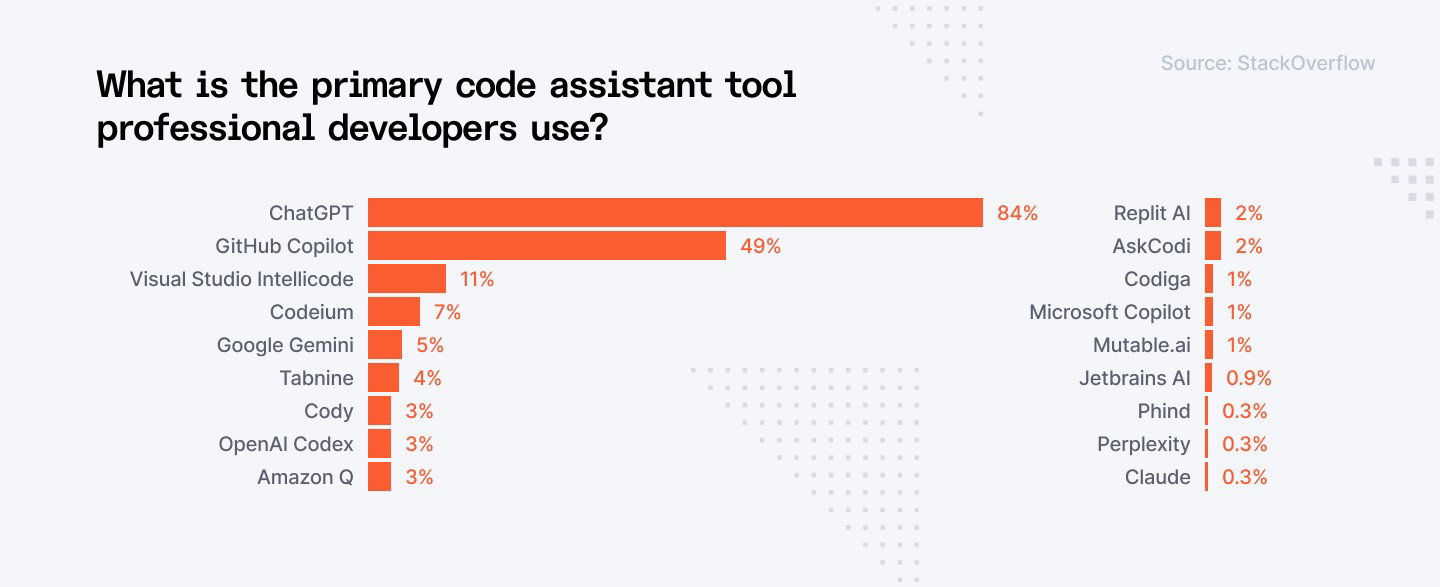
The statistics say one thing, but how about comparing Codex with other AI platforms? Let’s do that.
Codex Vs. Gemini Vs. Claude Vs. Copilot Vs. DeepSeek
Below is a coding-focused comparison table covering practical developer concerns, including accuracy, debugging, handling long-running contexts, test creation, and reliability.
| Criteria | OpenAI Codex | Google Gemini | Anthropic Claude | Microsoft Copilot | DeepSeek |
| Code Generation Quality | Good for projects | Good for structured tasks | Excellent for readable, maintainable code |
Good for autocomplete | Excellent for foundational tasks |
| Debugging Ability | Excellent | Moderate | Good | Good | Good |
| Refactoring & Cleanup Capability | Excellent | Moderate | Excellent | Good | Moderate |
| Test Case Generation Capability | Excellent | Good | Excellent | Moderate | Moderate |
| Language Excellence | Python, JS/TS, Go, Java, C#, SQL & more | Python & JS | Python & JS | JS, TS, Python | Python |
| Ability to Handle Large Codebases | Excellent | Moderate | Excellent | Moderate | Moderate |
| Limitations | Requires clear boundaries to avoid over-generation | Can hallucinate niche libraries | Slow with extremely complex logic tasks | Strongly GitHub-centric; limited to other workflows | Not ideal for large, multi-step tasks |
TL; DR
-
Codex is the most “agentic” tool as it can not only write code but can run, debug, and iterate on it as well.
-
Gemini excels in multi-modal coding tasks, making it valuable for UI, diagrams, and system design prompts.
-
Claude is the best writing partner for refactoring, explanations, and safe, readable code.
-
Copilot stays the best inline assistant, especially for GitHub workflows.
-
DeepSeek is the strongest budget performer, fast and low-cost for everyday coding.
Now that all this information is understood, how can one access the Codex? Let’s get to know that next.
Codex’s Access And Pricing Snapshot
OpenAI Codex doesn’t come as a separate subscription or isolated product anymore. Instead, it’s embedded into several OpenAI offerings depending on whether you're an individual developer, a team, or an enterprise.
Here’s how access works:
-
Access Through ChatGPT (Pro, Team And Enterprise)
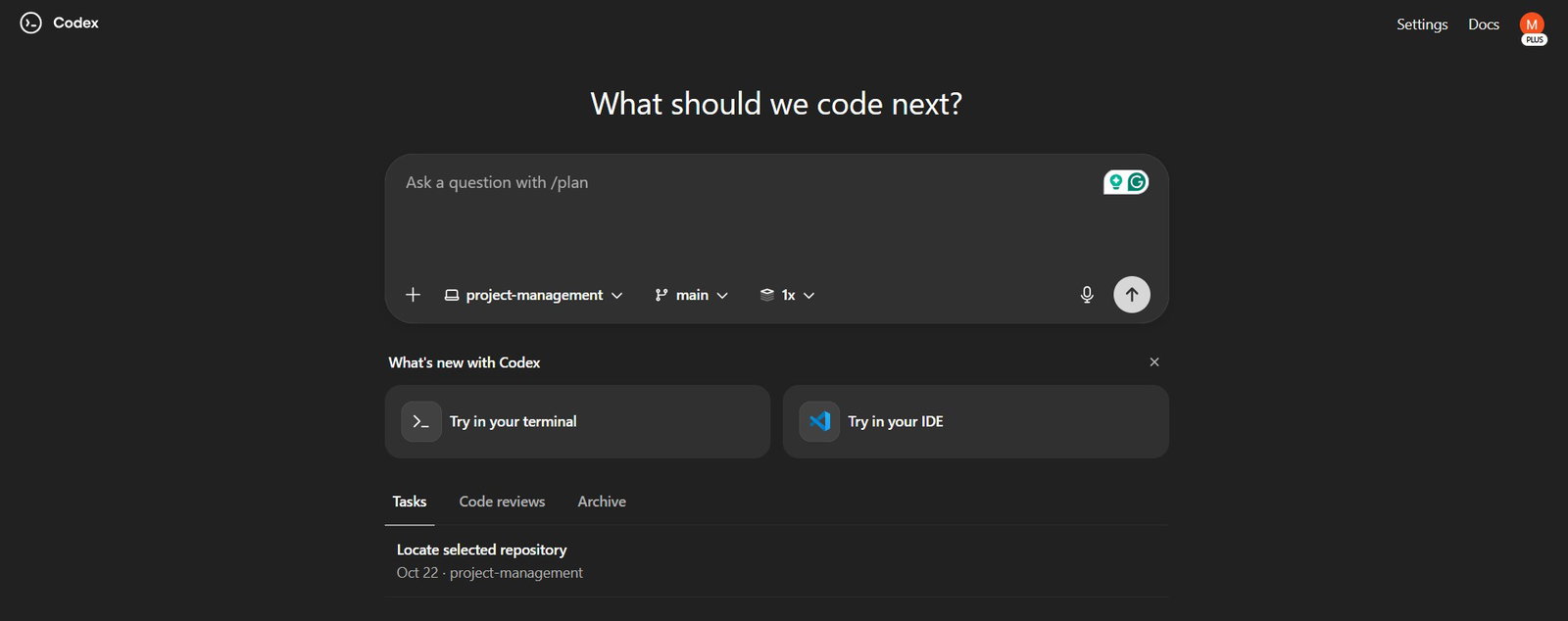
Codex is available inside ChatGPT as part of the upgraded GPT-5 coding agent capability.
| Plan | Access to Codex | Notes |
| ChatGPT Pro | Yes | Ideal for indie developers, students, and open-source contributors |
| ChatGPT Team | Yes | Multi-seat plans, admin controls, shared workspaces |
| ChatGPT Enterprise | Yes | SOC2, SSO, data isolation, longer context, priority performance |
You can chat, generate code, upload project files, and ask Codex to write, fix, or explain code within the ChatGPT interface.
-
Access Through API (Developers And Companies)
Codex functionality is available via the GPT-5/GPT-o series models refined for coding. This method is widely used by SaaS companies, dev-tool platforms, and enterprises building custom engineering automation.
-
Access Through IDE Integrations
OpenAI’s coding capabilities can be used in:
-
VS Code (via ChatGPT extension)
-
JetBrains IDEs (plugin support increasing)
-
GitHub Codespaces
-
Command Line (ChatGPT CLI)
These integrations provide inline coding assistance: autocomplete, inline explanations, test generation, debugging support, and code reviews.
-
-
Access Through Cloud Development Environments
Codex is also accessible in cloud-based sandboxes that allow:
-
Running code
-
Testing output
-
Generating pull requests
-
Performing multi-file edits
This makes Codex behave more like a true engineering agent rather than a simple suggestion engine.
-
-
Pricing Snapshot
OpenAI hasn’t branded Codex separately, so pricing corresponds to the models that power it.
| Offering | Price | Notes |
| ChatGPT Plus | $20/month | Includes access to advanced models with strong coding abilities, including GPT-5-Codex–powered features. |
| ChatGPT Pro/ Business | $200/month | Built for heavier or team usage, with higher limits and better performance. Comes with Codex capabilities. |
| ChatGPT Enterprise | Custom pricing | Enterprise-grade security, governance, SLAs, and maximum usage flexibility. Comes with Codex coding agents. |
P.S.: Exact pricing may vary depending on region, usage frequency, and the model tier selected.
Conclusion
Coding has always been a balance of creativity and complexity, and Codex gives developers the space to focus on what actually matters. Solving problems, designing systems, and building products that move fast without breaking clarity is what Codex is all about.
So, whether you’re prototyping a feature, wrangling legacy code, debugging a production issue, or onboarding a new codebase, Codex turns the slowest parts of the workflow into the smoothest. Not just that, but with its evolution into a GPT-5-powered coding agent, its capabilities are no longer theoretical; they’re something developers can use right now within the tools they already use.
If the past decade were about writing code faster, the next decade would be about thinking in code and letting AI help execute it. Codex is one of the clearest signs of that shift.
Keep experimenting. Keep exploring. The future of software development is already here. It is just waiting for you to build with it.
Frequently Asked Questions
What Is The Purpose Of OpenAI’s Codex?
OpenAI’s Codex is designed to help developers work faster by translating natural-language instructions into high-quality code, debugging issues, refactoring logic, and running tests. Its purpose is to reduce repetitive work and streamline the entire software development workflow without replacing engineering judgments.
Is There A Free Trial Available For OpenAI’s Codex?
Codex isn’t offered as a standalone product, so there’s no separate free trial. However, its capabilities are available inside ChatGPT through Plus, Business, and Enterprise plans. Developers can also experiment with Codex-like abilities using the OpenAI API on a pay-as-you-go basis.
How Secure Is Code Generated By Codex-Based AI Tools?
Codex inherits ChatGPT’s enterprise-grade security, including data isolation, SOC2 compliance, and no training on customer code. While it generates safe, high-quality output, human review is essential to ensure correctness, compliance, and alignment with project-specific security standards.
Tue, Nov 25, 2025

Enjoyed what you've read so far? Great news - there's more to explore!
Stay up to date with the latest news, a vast collection of tech articles including introductory guides, product reviews, trends and more, thought-provoking interviews, hottest AI blogs and entertaining tech memes.
Plus, get access to branded insights such as informative white papers, intriguing case studies, in-depth reports, enlightening videos and exciting events and webinars from industry-leading global brands.
Dive into TechDogs' treasure trove today and Know Your World of technology!
Disclaimer - Reference to any specific product, software or entity does not constitute an endorsement or recommendation by TechDogs nor should any data or content published be relied upon. The views expressed by TechDogs' members and guests are their own and their appearance on our site does not imply an endorsement of them or any entity they represent. Views and opinions expressed by TechDogs' Authors are those of the Authors and do not necessarily reflect the view of TechDogs or any of its officials. While we aim to provide valuable and helpful information, some content on TechDogs' site may not have been thoroughly reviewed for every detail or aspect. We encourage users to verify any information independently where necessary.
Loading comments...