
Customer Engagement
A Step-By-Step Guide To Customer Journey Mapping
Share
Introduction
Why does she repeat everything three times?
Why does she pause like the answer isn’t obvious?
Why does the map keep pointing at things that are clearly right there?
Isn’t Dorra unnecessarily slow?
What if we tell you Dora isn’t made for grown-ups?
She is made for kids who are learning how to learn. For them, those pauses are meant to drive engagement. The repetition is for reassurance.
Now, in marketing terms, take Dora out of the picture, and the journey falls apart. The purchase may still exist but the customer journey to reach it becomes confusing and frustrating.
That is why the Customer Journey Mapping is important.
In today’s article, we will discuss a step-by-step guide to Customer Journey Mapping. Let’s dive in.
TL;DR
-
Customer journey mapping helps businesses see their experience the way customers actually live it, not the way teams assume it works.
-
Customer journey mapping starts by defining the right persona and goal, then visualizing how customers actually move across stages and touchpoints.
-
It captures actions, thoughts, emotions, and friction points to reveal where experiences break or stall.
-
Mapping only works when insights are tied to real data, ownership, and measurable outcomes.
-
The goal isn’t a polished diagram, but a clearer path that helps customers move forward with less effort and more confidence.
What Is Customer Journey Mapping?
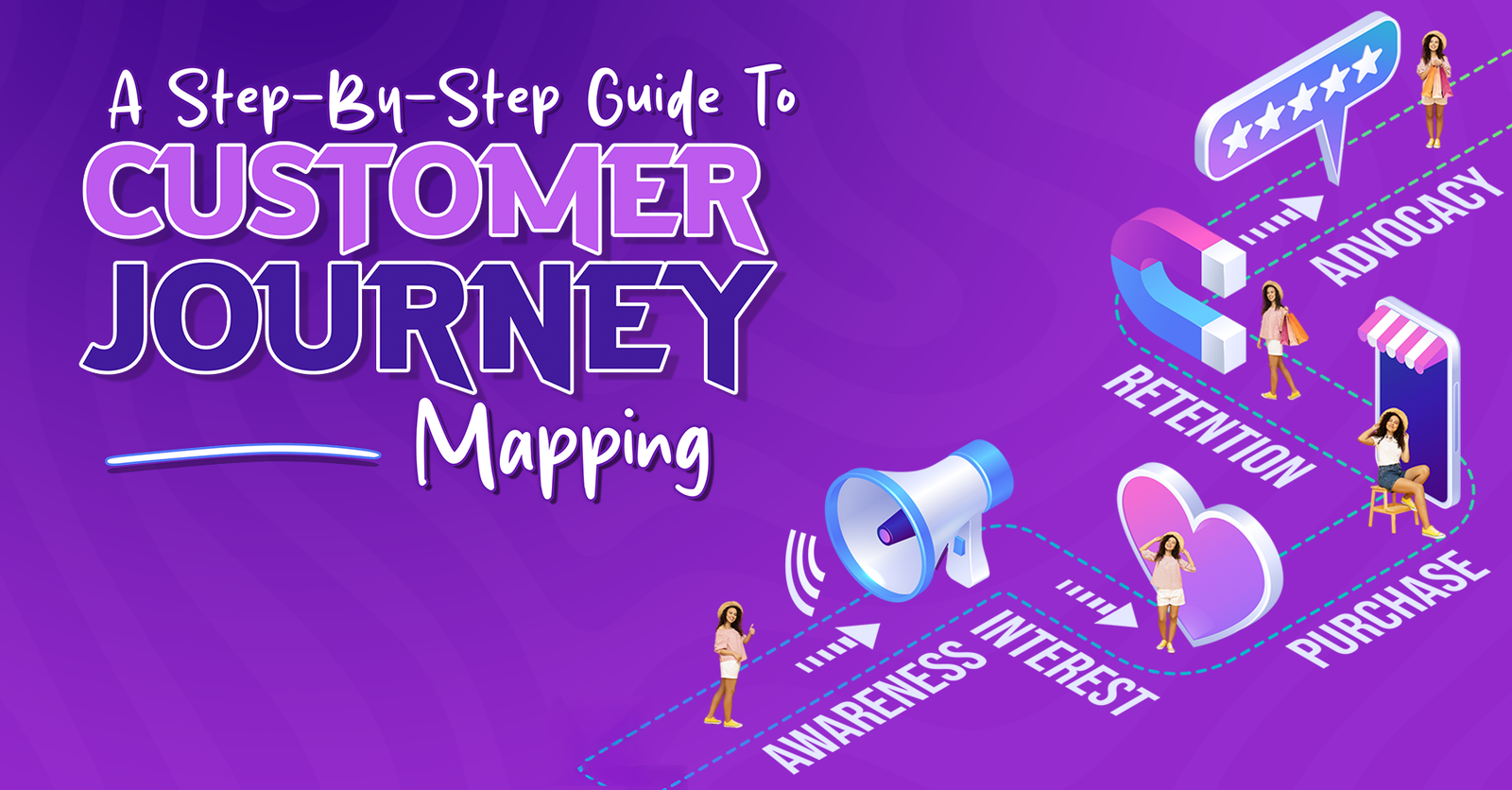
At its core, customer journey mapping is a way to see the business product or service through the customer experience.
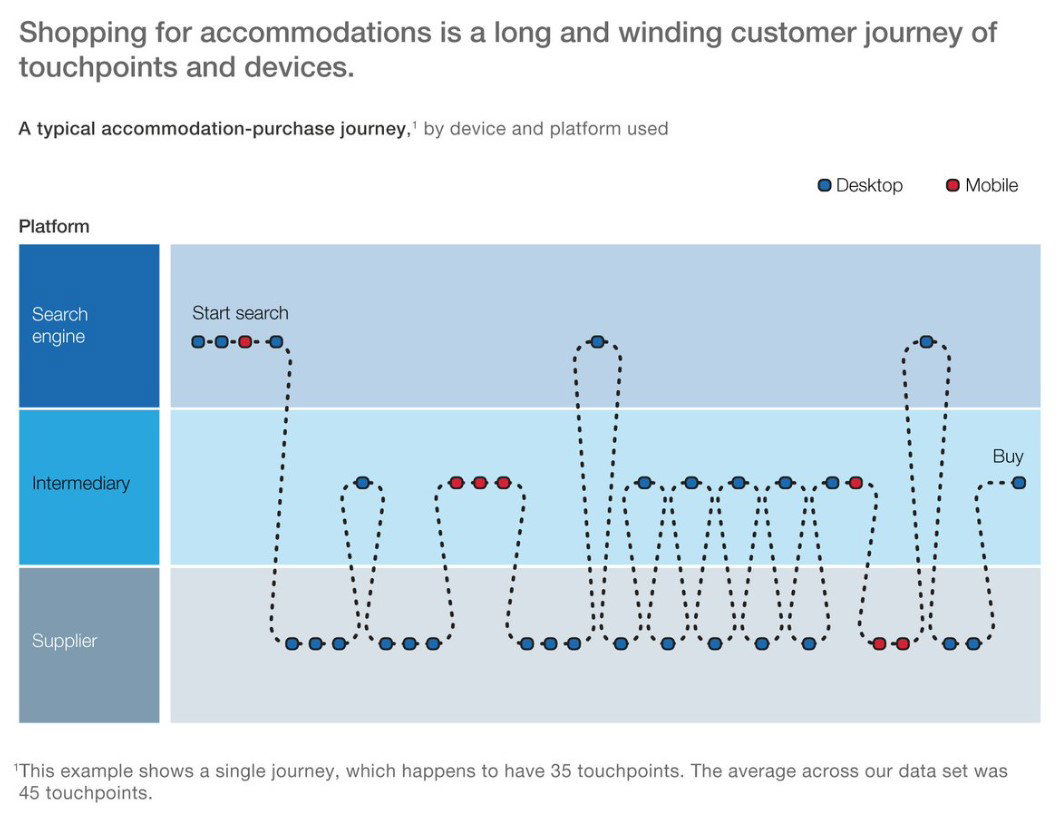
This is where many businesses get it wrong. They assume the journey is linear, logical, and neatly aligned with internal processes. In reality, customers jump channels, revisit steps, abandon paths, and make decisions based on emotion just as much as information.
McKinsey found that the average customer booking a single accommodation reservation online switched nearly 6 times between websites and mobile channels during a single journey.
Thus, journey mapping forces teams to slow down and ask uncomfortable but necessary questions like "Where do customers feel lost? Which steps feel repetitive or unclear? Where do they need reassurance, even if it feels redundant to us?”
Just like Dora’s map didn’t exist to show the destination but to guide learners safely from one point to the next, a customer journey map exists to make progress feel possible at every step. It’s not about simplifying business. It’s about simplifying the experience.
So, before diving into the steps, it helps to understand when journey mapping delivers the most value, and when teams should pause and map before pushing ahead.
When Should You Create A Customer Journey Map?
Customer journey mapping isn’t something you do once and forget. It’s most effective when a business is at a moment of change, uncertainty, or visible friction.
Here’s when you should consider creating a customer journey map:
-
Conversion Drop-Offs
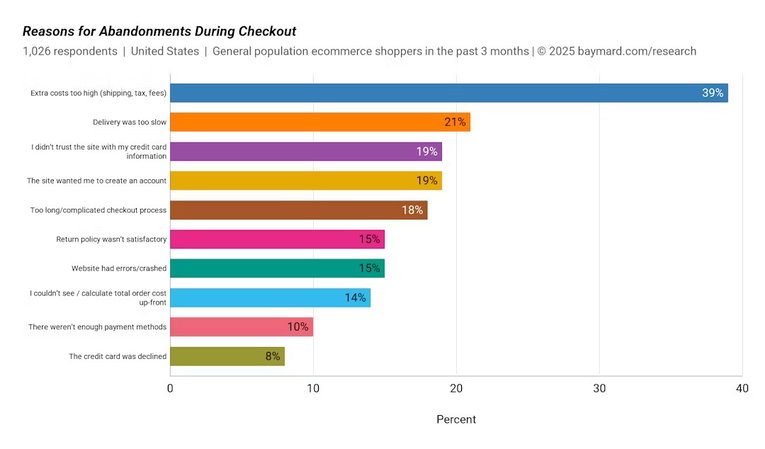
Customers consistently abandon key stages such as onboarding, checkout, and renewal, and the reasons aren’t apparent from the data alone. Baymard’s 2025 analysis reports an average cart abandonment rate of 70.22%, highlighting how often journeys end at checkout.
-
A Launch Of Something New
New products, features, markets, or customer segments often break assumptions that previously worked. Gartner found that only 55% of product launches occur on schedule; for delayed launches (45%), 20% fail to meet internal targets on average.
-
Customer Feedback
Support tickets, reviews, and sales calls point to issues, but no one has a complete view of the experience. Microsoft reported that 90% of customers want to provide feedback, but only 37% are given the opportunity to do so, creating blind spots in the experience.
-
Internal Changes Impact Experience
New tools, processes, or team structures introduce handoff gaps that customers feel immediately. Salesforce research found that 70% of customers say connected processes (like seamless handoffs and context) are very important to winning their business.
-
Fixing Symptoms
Repeated tweaks don’t move the needle because the underlying experience hasn’t been fully understood. McKinsey notes 25% of customers will defect after just one bad experience, which is why journey-level fixes beat touchpoint-only patches.
Taken together, these signals point to one truth: journey mapping is a clarity tool for moments when assumptions no longer work.
Once you know when to map a journey, the next step is to understand the customer journey mapping process.
Step-By-Step Customer Journey Mapping Process
Customer journey mapping works best when it’s focused, grounded, and practical. Here’s a simple process that keeps teams aligned and avoids overengineering:
Step 1: Define The Persona And Goal
Start with one customer type and one clear objective. Mapping everything at once yields vague insights and no action.

Amazon’s Jeff Bezos framed it as “obsessive customer focus” being “the most protective of Day 1 vitality.”
Step 2: Set The Journey Scope
Decide where the journey begins and ends. This could be from initial awareness through purchase, or from onboarding through renewal. McKinsey’s journey research warns teams against mapping isolated moments.
Step 3: Outline The Journey Stages
Break the experience into logical phases that reflect how customers think and decide, not how internal teams are structured. Airbnb’s Brian Chesky popularized the idea of designing for extremes with an 11-star experience, thinking to reimagine stages beyond the obvious.
Step 4: Identify Touchpoints And Actions
List every interaction across channels and what customers are doing at each stage, including pauses, repeats, and detours. Salesforce found that 70% of customers say connected processes are very important to winning their business.
Step 5: Capture Thoughts, Emotions, And Friction
This is where insights emerge. Highlight confusion, hesitation, frustration, and moments of confidence or relief. Microsoft CEO Satya Nadella put it bluntly: “Empathy makes you a better innovator.”
Step 6: Attach Data And Evidence
Support assumptions with analytics, feedback, support tickets, and real customer quotes wherever possible. Netflix explicitly describes a “culture of experimentation and data-driven decision making” to test product experiences, and Booking.com is cited as running ~25,000 tests a year.
Step 7: Identify Opportunities And Prioritize
Turn pain points into opportunities for improvement, then rank them by impact and effort. McKinsey reports 25% of customers will defect after just one bad experience, which is why prioritization should start where failure is most costly.
Step 8: Align Ownership And Next Actions
Assign responsibility and translate insights into experiments, fixes, or roadmap changes. Zappos’ Tony Hsieh famously set the standard: “Customer service shouldn’t just be a department; it should be the entire company.”
You see, the real outcome of this process is a shared view of the customer experience that helps teams make smarter, faster, and more confident decisions.
However, even with the right process, journey mapping often breaks down in execution. That is why we need to discuss common mistakes and the right tools to make all the difference.
Topics For More Insights
Common Mistakes To Avoid While Mapping The Customer Journey
Many journey maps fail not because the idea is flawed, but because execution misses the point. Here are common pitfalls and how the right tools can help avoid them.
-
Mapping Too Broadly
Trying to cover every persona and journey at once leads to shallow insights. Templates and whiteboarding tools help teams stay focused on one journey at a time. McKinsey notes journey performance is 30–40% more strongly correlated with customer satisfaction than touchpoint performance. Tools like Miro or Lucidchart help teams map a journey clearly using focused templates.
-
Treating The Map As A One-Time Deliverable
Static diagrams quickly become outdated. Collaborative tools make it easier to revisit, update, and iterate as journeys evolve. Collaborative platforms like Miro, Lucidchart, UXPressia, or Smaply make ongoing updates and sharing easier than slide-based diagrams.
-
Relying On Assumptions Instead Of Evidence
Maps built without real data often reflect internal bias. Analytics, session recordings, surveys, and support tools add grounding and credibility. Behavior tools such as Hotjar (session recordings, surveys) and Fullstory (session replay) add the missing “why” behind analytics and help validate where friction actually happens.
-
Ignoring Emotions And Context
Overly functional maps miss why customers behave the way they do. Structured templates prompt teams to capture feelings, not just actions. Satya Nadella’s line lands here: “Empathy makes you a better innovator.” Templates that force “think/feel” layers (Miro, UXPressia, Smaply) keep the journey grounded in real experience, not just steps.
-
Failing To Assign Ownership
Insights without accountability rarely lead to change. Tools that support comments, tasks, and ownership help move insight into action. Tony Hsieh’s reminder still applies: customer experience cannot sit in one department. Use tools that support comments, tasks, and handoffs (Miro boards linked to work trackers, journey platforms like Smaply/UXPressia) so “next actions” have owners.
The right tools don’t replace thinking—but they reduce friction and keep teams aligned.
With the process, pitfalls, and tools in place, the real question becomes how journey mapping fits into everyday decision-making.
Conclusion
Customer Journey Mapping is not just about documenting what already exists. It’s also about revealing what customers experience, but businesses often overlook it.
Just like Dora’s pauses, prompts, and checkpoints weren’t unnecessary, many of the moments we’re tempted to remove are exactly what help customers move forward with confidence. Journey mapping slows teams down just enough to see where clarity is missing and where guidance matters most.
When done well, a journey map becomes more than a visual. It becomes a shared language for teams, a reality check for assumptions, and a practical guide for building better experiences.
Frequently Asked Questions
What Are The 7 Steps To Create A Customer Journey Map?
Define the goal and persona, set scope, outline stages and touchpoints, gather real data, capture actions, emotions, and friction, visualize the journey, then identify improvements, assign owners, and keep it updated as behavior changes.
What Are The Best Software Tools For Creating Customer Journey Maps?
Commonly used options include Miro and Lucidchart for rapid collaborative mapping, UXPressia and Smaply for journey-specific CX workflows, and Microsoft Visio and Figma for structured diagrams or design-led artifacts.
How To Choose A Customer Journey Mapping Platform For Enterprise Use?
Prioritize SAML SSO and SCIM provisioning, role-based permissions, activity or audit reporting, and strong security posture (SOC 2 or ISO-style certifications). Validate integrations for analytics and research inputs, plus governance controls for multi-team collaboration at scale.
Mon, Feb 2, 2026

Enjoyed what you've read so far? Great news - there's more to explore!
Stay up to date with the latest news, a vast collection of tech articles including introductory guides, product reviews, trends and more, thought-provoking interviews, hottest AI blogs and entertaining tech memes.
Plus, get access to branded insights such as informative white papers, intriguing case studies, in-depth reports, enlightening videos and exciting events and webinars from industry-leading global brands.
Dive into TechDogs' treasure trove today and Know Your World of technology!
Disclaimer - Reference to any specific product, software or entity does not constitute an endorsement or recommendation by TechDogs nor should any data or content published be relied upon. The views expressed by TechDogs' members and guests are their own and their appearance on our site does not imply an endorsement of them or any entity they represent. Views and opinions expressed by TechDogs' Authors are those of the Authors and do not necessarily reflect the view of TechDogs or any of its officials. While we aim to provide valuable and helpful information, some content on TechDogs' site may not have been thoroughly reviewed for every detail or aspect. We encourage users to verify any information independently where necessary.
Loading comments...