
Networking Solutions
Top 5 Network Intelligence Software In 2026
Share
TL;DR
-
Kentik: Delivers comprehensive telemetry depth and natural-language insights through an AI advisor.
-
Cisco ThousandEyes: Offers end-to-end path visualization and synthetic testing across hybrid environments.
-
Progress WhatsUp Gold: Provides interactive topology mapping paired with automated network detection and response.
-
SolarWinds Observability: Features full-stack visibility with machine learning-powered alert prioritization.
-
Datadog: Supplies unified cloud and physical device monitoring to reduce platform sprawl.
Introduction
Let us return to the good old school days where you can forget about stressful homework assignments. Imagine navigating a massive, sprawling campus with hundreds of interconnected classrooms, hallways, and busy activity rooms. As a hallway monitor, keeping an eye on every single student to maintain perfect order would feel completely overwhelming. Fortunately, a smart robotic monitor can step in to observe student paths, track interactions, and subtly spot mischief before trouble even starts. Network Intelligence Software serves as that exact robotic hall monitor for modern enterprise digital environments.
Instead of students, it tracks data packets traveling across a company's complex infrastructure to learn normal behaviors and flag anomalies. This advanced oversight optimizes traffic flow, maintains necessary bandwidths, and proactively isolates security threats. Ultimately, these solutions transform raw data into actionable insights to ensure reliable connectivity and superior user experiences.
Dive in to explore the top 5 Network Intelligence Software solutions of 2026 that are keeping business infrastructures safe and efficient.
What Are Network Intelligence Software Solutions?
Network Intelligence Software solutions help IT teams and network admins collect, analyze, and visualize network data to optimize network performance, reliability, and security. With real-time monitoring, dashboards and alerts, and anomaly detection, IT teams get actionable insights that support strategies for capacity planning, threat detection, and compliance management.
Top 5 Network Intelligence Software Of 2026
Network Intelligence Tools help network administrators optimize performance, ensure reliable data delivery, and strengthen network security posture by turning raw network data into practical insights. So, dive in and secure your network with the best Network Intelligence Software of 2026!
 |
 |
 |
 |
 |
Kentik: Best AI Features
San Francisco-based Kentik was founded in 2014 as CloudHelix. Today, the company has around 250 employees based out of its headquarters and working remotely around the globe. Its customer base spans names such as Canva, McDonald's, Zoom, ServiceNow, Dropbox, eBay, Booking.com, Sky, GoDaddy, and more. Kentik has been named the Highest Performer by G2 in Network Monitoring Software and was named a High Performer in G2’s Winter 2025 report.
Why We Chose Kentik In 2026
One of the top network intelligence platforms, Kentik gives teams a unified network intelligence platform to see, query, and understand every part of their network, including internet edge, ISP, cloud, SD-WAN, campus, branch, data center, container, and AI infrastructure environments. It collects telemetry, flow logs, BGP, synthetics, SNMP, metrics, topology, and streaming data into one platform.
Universal Data Explorer, traffic analytics, alerting, integrations, and detection and cause analysis allow businesses to identify performance issues, understand traffic behavior, and optimize capacity across complex hybrid networks.
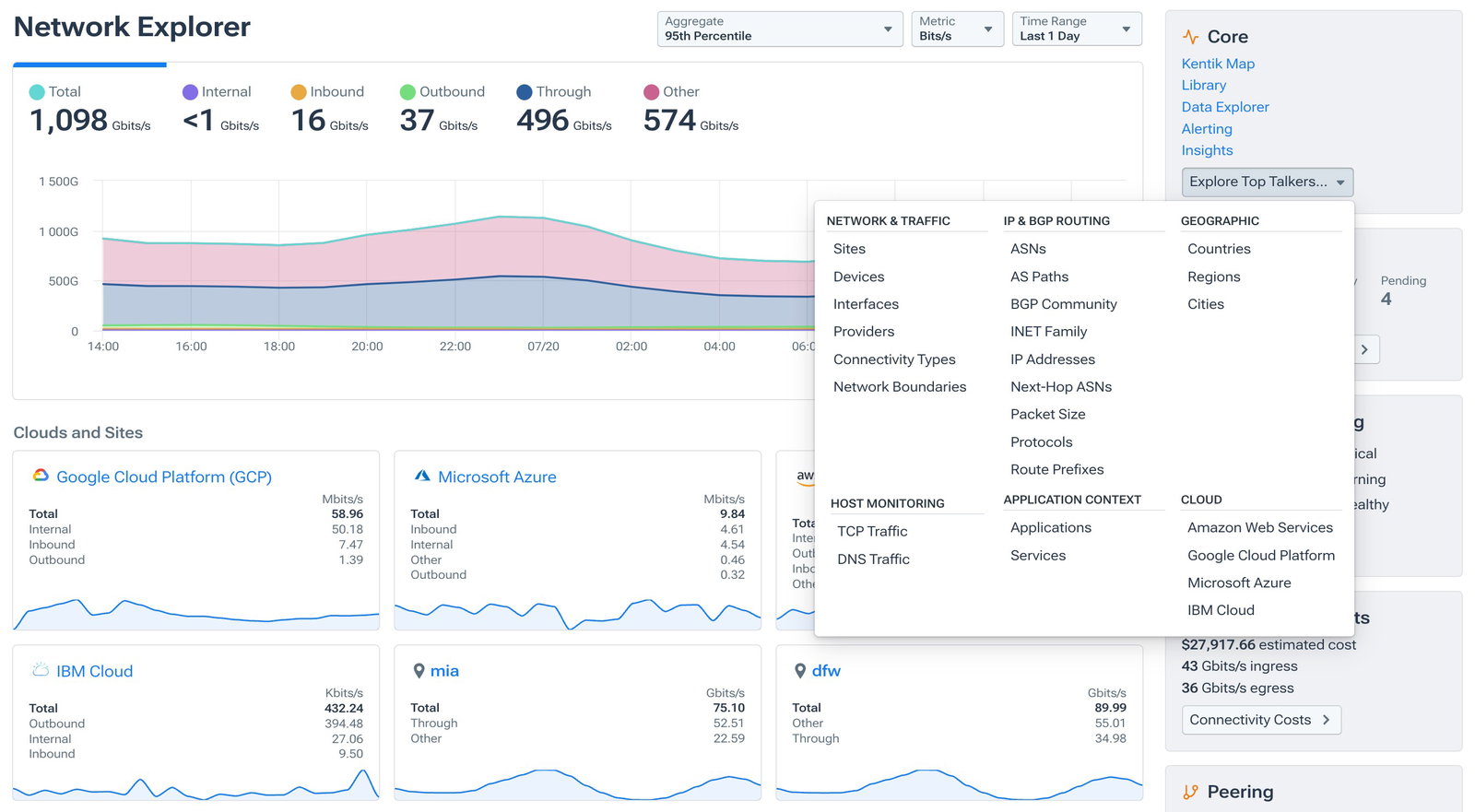
Kentik’s special factor is Kentik AI Advisor, which is designed to work like a network engineer. It supports natural-language investigations, runs multi-step queries across telemetry, alerts, configurations, diagnostics, and connectivity tests, and explains its reasoning with supporting evidence. Teams can use it to analyze traffic shifts, detect probable causes, assess service impact, identify costly cloud or WAN paths, and receive clear next steps for troubleshooting, optimization, reliability, and resilience.
Pricing
Kentik offers a free 30-day trial. Its Pro plan starts at $2,000 per month, billed annually, and supports 50 users. The Premier plan supports up to 1,000 users, with pricing available by contacting Kentik. Users can also request a demo to evaluate the platform before choosing a plan.
What Works & What Doesn't
| Pros | Cons |
| Easy to use | Data limitations |
| Insightful dashboards | Steep learning curve |
| Insightful analysis | Interactions confined to own network |
Our Final Take
Kentik is a strong fit for enterprises, service providers, cloud teams, and network operations teams managing distributed, hybrid, or high-volume networks. Its telemetry depth, AI-guided investigations, traffic intelligence, and cause analysis make it a powerful choice.
Cisco ThousandEyes: Best Overall
ThousandEyes was founded in January 2010, and by August of the same year it was acquired by Cisco, which was founded in 1984. A global name, Cisco houses its over 80,000 employees in more than 275 offices spread across 90 countries, including 20 offices that sport over 1,000 employees. Coming to ThousandEyes, the company boasts a customer base spanning 180 of the Fortune 500, 355 of the Global 2000, 10 of the top 10 US banks, and 8 of the top 10 global software companies, amid more. It was even named G2’s Top 100 Global Sellers of the Best Software in 2025.
Why We Chose Cisco ThousandEyes In 2026
Cisco ThousandEyes gives teams network intelligence across users, applications, services, clouds, and networks, helping them understand how every connected experience performs. It brings together cross-domain telemetry, AI-powered analysis, synthetic testing, flow data, SNMP data, and traffic insights to detect issues, correlate signals, and identify root causes faster.
With end-to-end visibility from any user to any application, teams can separate application slowdowns from network disruptions, understand traffic impact, and improve digital experience reliability.
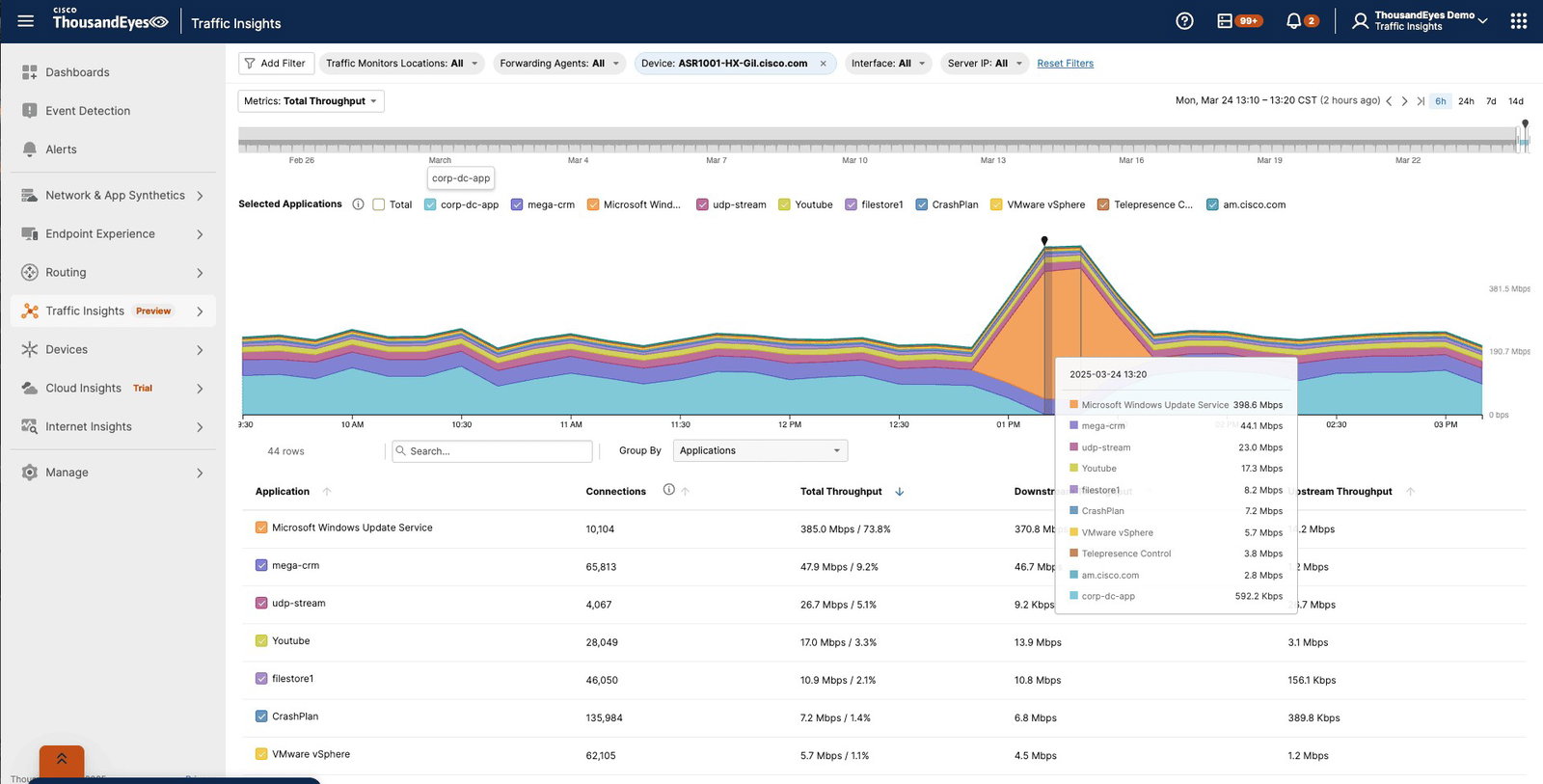
Cisco ThousandEyes’ comes with network and application synthetics and powerful path visualization, which continuously measures connectivity, latency, page load performance, routing, and service-level experience across the digital delivery chain. This helps IT teams see every hop from user to application, reveal hidden dependencies, and understand exactly where performance breaks down. As a Cisco product, it also connects naturally with Cisco’s broader product ecosystem.
Pricing
Cisco ThousandEyes offers customized pricing based on each organization’s visibility needs and is offered as an annual subscription. Users can contact Cisco ThousandEyes for a detailed usage estimate, chat with the team, send a message, or schedule a meeting.
What Works & What Doesn't
| Pros | Cons |
| Clear visibility | Steep learning curve |
| Detailed analytics | Complex configuration |
| Real-time alert notifications | Not very intuitive |
Our Final Take
Cisco ThousandEyes is best suited for enterprises that need deep visibility into digital experience, network paths, traffic behavior, and application performance. Its AI-driven intelligence, synthetic monitoring, traffic correlation, and Cisco ecosystem connectivity make it a leading network intelligence tool.
Progress WhatsUp Gold: Best For Security
Founded in 1981, Progress Software Corporation is a publicly traded company (Nasdaq) that has three headquarters: Burlington (Massachusetts) serves as its global headquarters, the Netherlands’ Rotterdam houses its European HQ, and Singapore is the designated Asia-Pacific and Japan HQ. The company has a workforce of 3000+ employees spread across 12 offices. Its customer base spans 25,000 companies globally, and includes Citi, HP, AT&T, Ford, Nestle, and more. Progress’ WhatsUp Gold was named a Leader and a High Performer in G2’s Spring 2026 report.
Why We Chose Progress WhatsUp Gold In 2026
Progress WhatsUp Gold helps teams gain network intelligence across on-premises, cloud, wireless, virtual, system, application, and infrastructure environments. It monitors device status, availability, performance, response times, bandwidth usage, configurations, and traffic flows from one platform. Its interactive topology map shows network resources, connectivity, and dependencies, helping teams diagnose issues faster.
Using network traffic analysis, customizable dashboards, threshold-based alerts, and historical trend reporting, businesses can identify bottlenecks, understand performance behavior, and reduce downtime before users are affected.
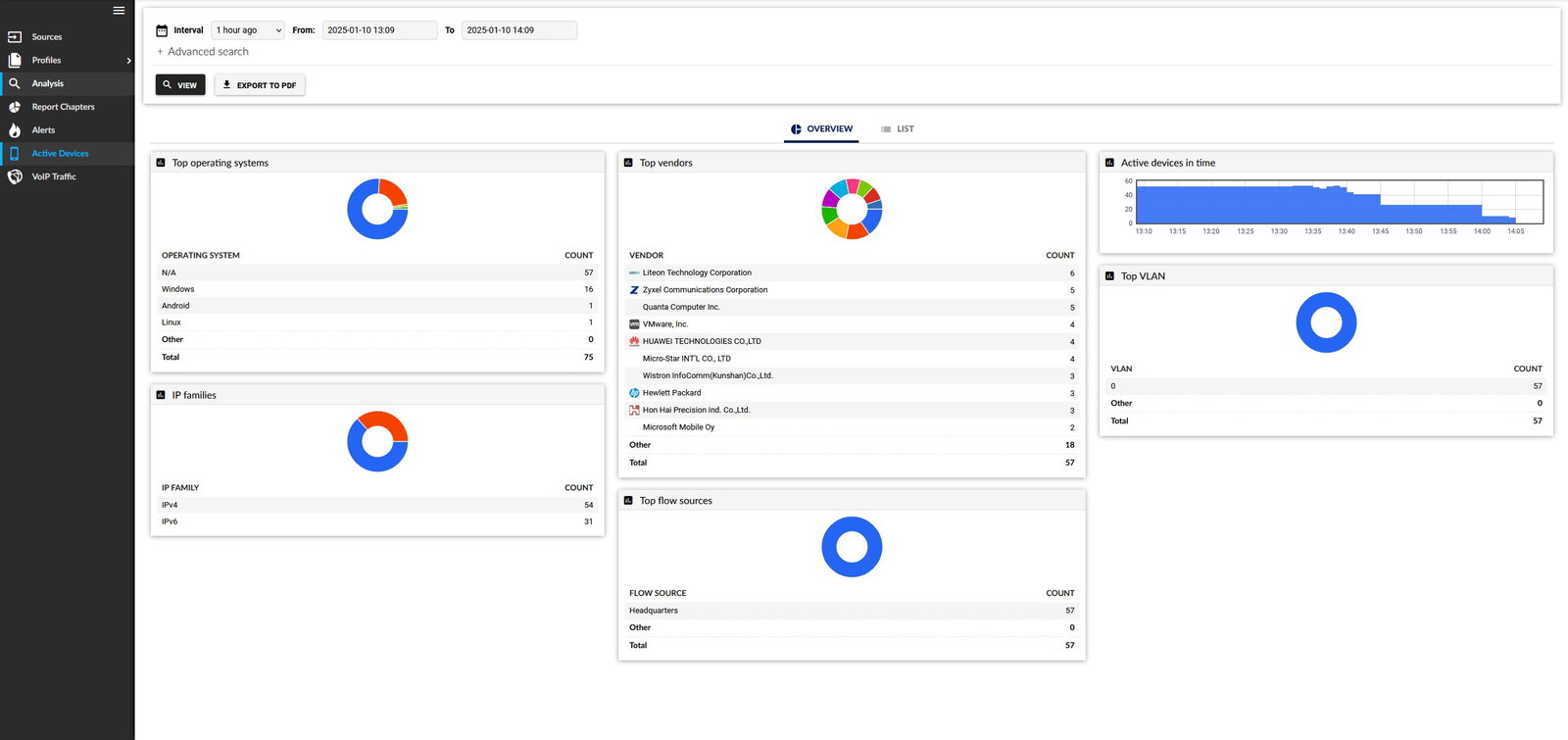
Progress WhatsUp Gold adds deeper network intelligence through its Network Detection and Response capabilities. It combines deep network visibility with automated detection, actionable insights, and faster incident investigation across hybrid networks. This helps teams detect suspicious traffic, ransomware risks, insider misuse, lateral movement, and advanced threats more effectively.
Pricing
Progress WhatsUp Gold offers customized pricing based on company requirements. Infrastructure Performance & Traffic Monitoring is available through Perpetual or Subscription licenses across Premium and Total Plus plans. Premium suits small to medium-sized businesses with growing IT infrastructure, while Total Plus supports organizations needing advanced monitoring capabilities. Network Detection and Response plans include Business, Enterprise, Enterprise Plus, and Enterprise Scale.
What Works & What Doesn't
| Pros | Cons |
| Easy to use | Expensive, especially due to add-ons |
| Real-time performance monitoring | Steep learning curve |
| Quick identification and resolution | Poor and outdated interface |
Our Final Take
Progress WhatsUp Gold is best suited for IT and NetOps teams that need practical network intelligence across hybrid infrastructure. Its topology mapping, traffic analysis, alerting, configuration management, and NDR capabilities make it a strong option for improving uptime, visibility, and response.
Topics For More Insights
SolarWinds Observability: Best For Enterprise
Founded in 1999, SolarWinds has its headquarters in Austin, Texas, and a workforce of over 2,000 employees spread across 11 global offices. It comes in strong with customers such as Amazon, McDonald's, Morgan Stanley, Walmart, CVS Health, and more. SolarWinds Observability earned the “Users Most Likely To Recommend” recognition in the Enterprise category in G2’s Spring 2026 report.
Why We Chose SolarWinds Observability In 2026
SolarWinds Observability helps teams turn network and infrastructure insight into action across cloud-native, on-premises, and hybrid environments. It delivers unified visibility across networks, servers, VMs, applications, cloud infrastructure, SDWAN, and connected services from a single pane of glass. Network performance monitoring, device discovery, application mapping,
Using its NetPath path analysis, NetFlow traffic insights, AIOps, and machine learning-powered alert prioritization, the platform helps teams detect issues earlier, reduce alert fatigue, understand service dependencies, and troubleshoot network performance problems faster.
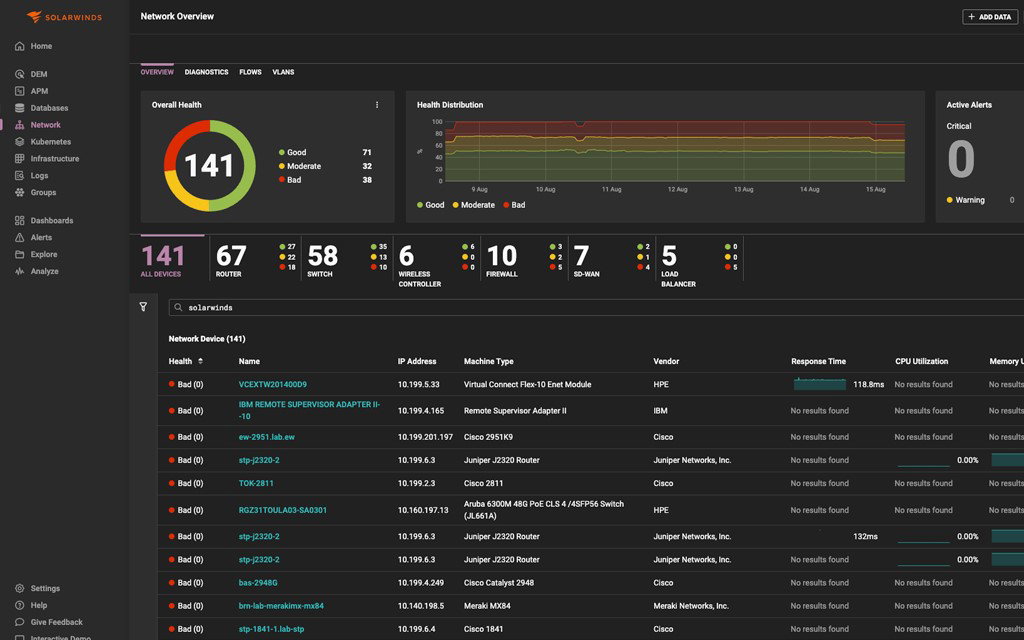
SolarWinds Observability combines network intelligence with full-stack observability across infrastructure, applications, databases, and digital experience. Its self-hosted and cloud infrastructure capabilities help teams track server health, availability, capacity, virtualization resources, AWS and Azure environments, containers, and Kubernetes. This gives IT teams both real-time and historical context to understand usage trends, optimize resources, plan capacity, and see how network conditions affect business services and user experience.
Pricing
SolarWinds Observability pricing starts at $12.00 per active network device or host for Network and Infrastructure Observability. Network devices and hosts are counted at 1:1, cloud services at 3:1, and containers at 10:1. Related services include Application Observability from $27.50 per service, Log Observability from $5.00 per GB per month, Database Observability from $70.00 per database instance, and Digital Experience Observability from $10.00. All quotes are prices per month, billed annually.
What Works & What Doesn't
| Pros | Cons |
| Easy to use | Expensive for small companies |
| Unified monitoring and visibility | Steep learning curve |
| Intuitive user interface | Integration issues |
Our Final Take
SolarWinds Observability is best suited for IT, infrastructure, and network teams that need unified intelligence across hybrid environments. Its network performance insights, NetPath analysis, NetFlow visibility, AIOps, and full-stack context make it a key option.
Datadog: Best For Integration
Datadog was founded in 2010. Today, it has its headquarters in Times Square, the heart of New York City. The company employs over 8,100 people across 34 offices in global locations. Its customers include Nasdaq, Samsung, Capgemini, Lenovo, Shell, Siemens, Deloitte, Maersk, DreamWorks, Comcast, and thousands of others. Datadog was named a Leader in G2’s Summer 2026 and Fall 2025 report; just one of its many accolades.
Why We Chose Datadog In 2026
Datadog Network Monitoring helps teams reduce tool sprawl by bringing visibility across any device on any network, including on-premises, SD-WAN, and wireless environments. It correlates data across applications, networks, devices, and infrastructure, helping teams investigate and remediate issues with intelligent insights and alerting.
Users can monitor connectivity performance across cloud and on-premises endpoints, gain hop-by-hop visibility into hybrid network traffic, correlate NetFlow traffic with the infrastructure and applications behind each connection, and pivot from service-level communication to underlying physical network devices.
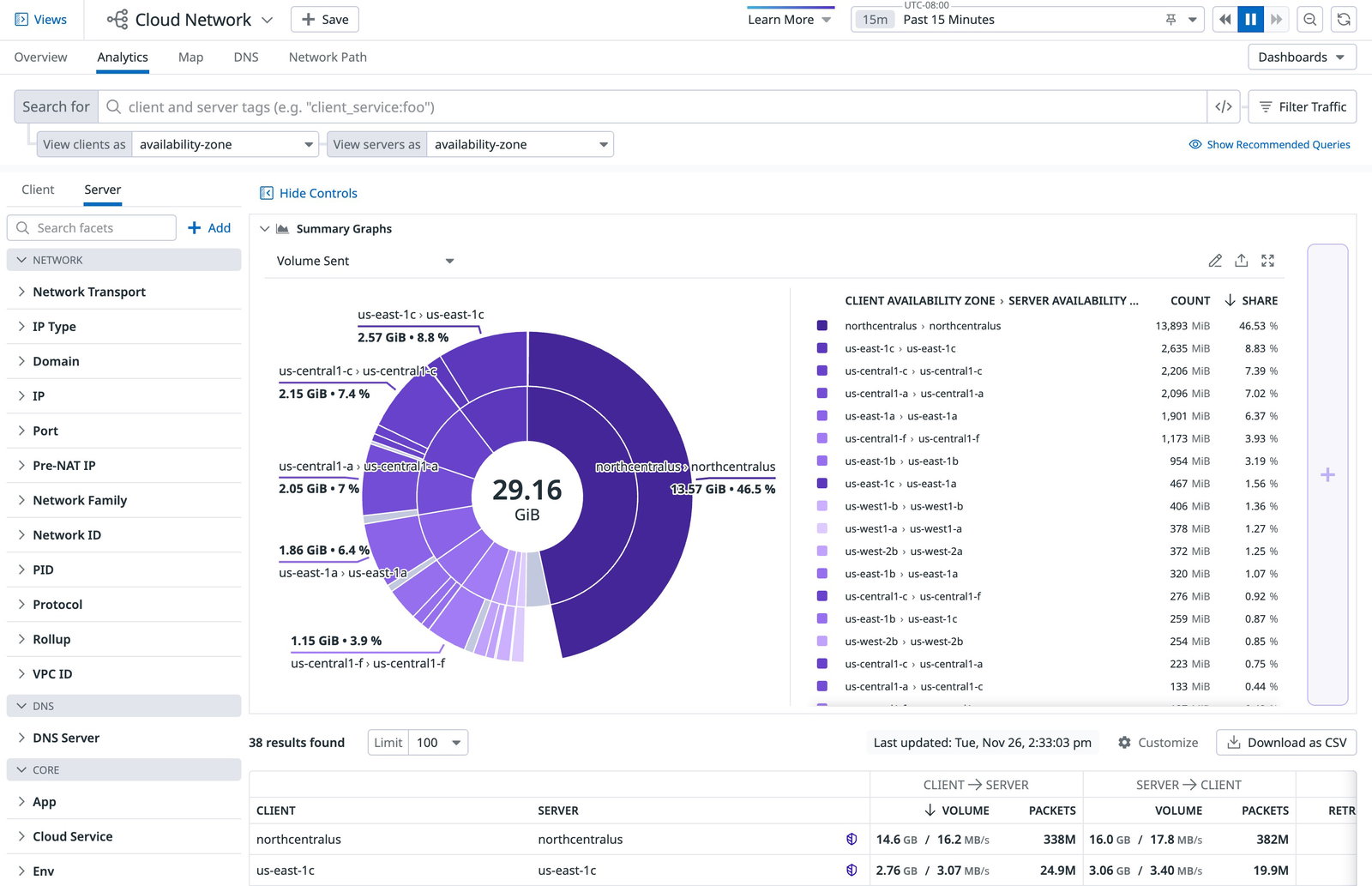
Datadog also sports Cloud Network Monitoring and Network Device Monitoring for deeper visibility across modern and physical environments. Teams can visualize application traffic paths, track latency and packet loss, monitor service-to-service interactions, and investigate traffic between cloud, hybrid, and on-premises endpoints. It also supports SNMP metrics, SNMP Traps, APIs, NetFlow, syslogs, topology maps, vendor coverage, traffic flow analysis, anomaly detection, and bandwidth forecasting to improve troubleshooting and MTTR.
Pricing
Datadog offers flexible, transparent pricing with multi-year and volume discounts available. Under Network Monitoring, Cloud Network Monitoring starts at $5 per host, per month. Network Device Monitoring starts at $7 per device per month, while Wireless Access Points start at $4 per device per month. NetFlow Monitoring is available as an add-on at $0.65 per million records, per month for 30-day retention.
What Works & What Doesn't
| Pros | Cons |
| Easy to use | High subscription cost |
| Comprehensive real-time monitoring | Steep learning curve |
| Intuitive dashboard | Challenging setup and integration |
Our Final Take
Datadog is best suited for teams that need network intelligence across applications, infrastructure, devices, and traffic flows. Its cloud and device monitoring depth, correlation capabilities, topology visibility, and intelligent alerting make it a strong choice for hybrid and multi-cloud network operations.
Top 5 Network Intelligence Software Comparison
| Criteria |  |
 |
 |
 |
 |
| Starting Price | $2,000 per month (50 users) | Custom | Custom | $12 per active network device or host, per month | $5 per host, per month |
| Avg. User Rating | 4.8 | 4.5 | 4.4 | 4.3 | 4.4 |
| Trial Period/Demo | 30-day free trial | 15-day free trial | 30-day free trial | 30-day free trial | 14-day free trial |
| Key Features | AI Advisor, Traffic Analytics, Cause Analysis | Path Visualization, Synthetic Testing, Traffic Insights | Topology Mapping, Traffic Analysis, Threat Detection | NetPath Analysis, Alert Prioritization, Full-Stack Visibility | Cloud Monitoring, Device Monitoring, Traffic Correlation |
| Integrations | Slack, Cloudflare, Atlassian, Nokia, and more | Cisco platforms, New Relic, BigPanda, Dynatrace, and more | Freshservice, Grafana Labs, ServiceNow, VMware vSphere, and more | Microsoft 365, Microsoft, ServiceNow, Splunk, and more | AWS, Claude, Rippling, Slack, and more |
Conclusion
Network Intelligence Software has become essential for businesses that need reliable, secure, and high-performing digital infrastructure. From AI-powered investigations and end-to-end path visibility to topology mapping, full-stack observability, and cloud network monitoring, these tools help IT teams move from reactive troubleshooting to proactive optimization. The right platform depends on your network complexity, business scale, security priorities, and integration needs, but each solution on this list brings strong capabilities for modern network operations.
Frequently Asked Questions
Which Are The Top Network Intelligence Software Solutions In 2026?
The top Network Intelligence Software solutions in 2026 are Kentik, Cisco ThousandEyes, Progress WhatsUp Gold, SolarWinds Observability, and Datadog. These tools help businesses monitor network performance, analyze traffic, detect issues, improve security visibility, and troubleshoot problems across hybrid, cloud, on-premises, and distributed network environments.
What Is Network Intelligence Software Used For?
Network Intelligence Software is used to collect, analyze, and visualize network data so IT and network teams can improve performance, reliability, and security. It helps teams monitor traffic, detect anomalies, identify bottlenecks, receive alerts, plan capacity, troubleshoot outages, and understand how network behavior affects applications and user experience.
How Do I Choose The Best Network Intelligence Software For My Business?
To choose the best Network Intelligence Software, businesses should consider their network size, infrastructure type, cloud usage, security needs, monitoring requirements, integrations, pricing, and ease of use. Enterprises with complex hybrid networks may prefer tools with deep telemetry and AI-driven insights, while smaller IT teams may prioritize simple dashboards, topology mapping, automated alerts, and flexible pricing.
Mon, Jun 29, 2026

Enjoyed what you read? Great news – there’s a lot more to explore!
Dive into our content repository of the latest tech news, a diverse range of articles spanning introductory guides, product reviews, trends and more, along with engaging interviews, up-to-date AI blogs and hilarious tech memes!
Also explore our collection of branded insights via informative white papers, enlightening case studies, in-depth reports, educational videos and exciting events and webinars from leading global brands.
Head to the TechDogs homepage to Know Your World of technology today!
Disclaimer - Reference to any specific product, software or entity does not constitute an endorsement or recommendation by TechDogs nor should any data or content published be relied upon. The views expressed by TechDogs' members and guests are their own and their appearance on our site does not imply an endorsement of them or any entity they represent. Views and opinions expressed by TechDogs' Authors are those of the Authors and do not necessarily reflect the view of TechDogs or any of its officials. While we aim to provide valuable and helpful information, some content on TechDogs' site may not have been thoroughly reviewed for every detail or aspect. We encourage users to verify any information independently where necessary.
Loading comments...