Virtualizations
Top 5 Data Center Virtualization Software Of 2026
Share
TL;DR
-
VMware vSphere delivers mature virtualization for virtual machines, Kubernetes, high availability, and hybrid infrastructure modernization.
-
Oracle Linux Virtualization Manager offers enterprise-grade KVM virtualization with strong Oracle Linux alignment and support-backed deployment options.
-
AWS provides elastic compute virtualization through EC2, Nitro, and Outposts for cloud and hybrid data center needs.
-
Informatica strengthens the virtualized data layer through governed data integration, metadata intelligence, and AI-powered automation.
-
FME Platform enables no-code data workflow automation across systems, formats, clouds, and spatial environments.
Introduction
You know how airports somehow keep operating even when thousands of passengers, flights, bags, gates, crews, and runway schedules are moving at the same time? It looks chaotic from the outside, but behind it all is a control tower making sure every moving part knows where to go.
Now imagine if that same airport had to rebuild a gate every time passenger traffic increased, add a new runway every time flights scaled up, or manually redirect every bag whenever routes changed. Ridiculous, right?
Yet that is what traditional data centers can start to feel like when infrastructure is too tightly tied to physical hardware.
As businesses grow, applications multiply. Workloads shift. Data volumes rise. Compliance pressure increases. Hybrid cloud environments become harder to manage. Suddenly, every infrastructure decision feels heavier than it should.
That is where Data Center Virtualization Software comes in. These platforms give IT teams a smarter control tower by abstracting servers, workloads, storage, cloud capacity, and data operations into more flexible digital environments.
So, if your organization wants to modernize infrastructure without losing visibility or control, let’s explore the Top 5 Data Center Virtualization Software Solutions of 2026.
However, before that, let’s quickly understand what Data Center Virtualization Software actually does.
What Is Data Center Virtualization Software?
Data Center Virtualization Software is a digital solutions that help organizations separate data center resources from fixed physical hardware. Instead of relying only on dedicated servers, storage systems, or network components, IT teams can create and manage virtual machines, virtualized workloads, cloud capacity, governed data access, and automated workflows from centralized platforms.
Depending on the platform, the focus may vary. Some tools specialize in compute virtualization and virtual machines, while others support hybrid cloud extension, data integration, metadata governance, or automated workflow movement across systems.
Now that we understand how virtualization helps modern data centers become more flexible and manageable, let’s get into the list we are all here for.
Top 5 Data Center Virtualization Software Of 2026
Modern data centers are no longer just rooms full of servers. They are distributed, cloud-connected, data-heavy environments that need flexibility without turning into operational chaos. Here are the Top 5 Data Center Virtualization Software Solutions of 2026, each helping businesses modernize infrastructure, reduce hardware dependency, improve workload mobility, and bring better control to complex IT operations.
 |
 |
 |
 |
 |
VMware vSphere: Best Overall
VMware vSphere remains one of the most recognized names in enterprise virtualization, now operating under Broadcom. The platform supports virtual machines, Kubernetes clusters, hyperconverged infrastructure, and centralized workload management. With strong ratings across G2, Capterra, and TrustRadius, vSphere continues to retain its place as a reliable choice for organizations modernizing large-scale data center operations.
Why We Chose VMware vSphere In 2026
VMware vSphere stands out because it combines mature virtualization with enterprise workload control. Teams can use it to provision virtual machines, manage compute resources, enable live migration, improve availability, and support containerized workloads. Its long-standing ecosystem, administrator familiarity, and integration with VMware Cloud Foundation make it especially valuable for hybrid infrastructure strategies.
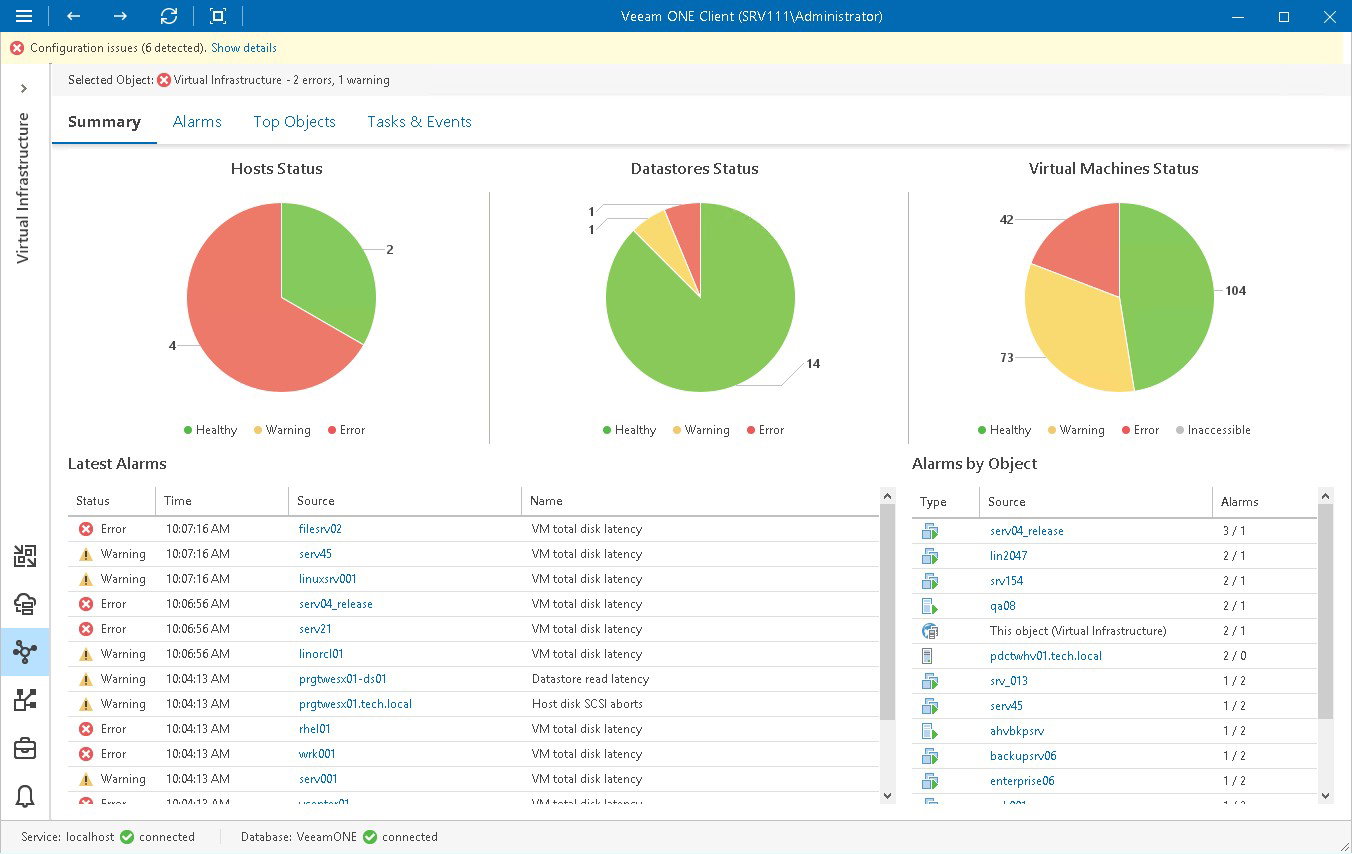
Its practical value lies in helping enterprises modernize without abandoning their existing virtualization investments. Features such as vCenter management, vMotion, High Availability, Distributed Resource Scheduler, lifecycle management, and security controls support uptime, workload mobility, and operational consistency across large data center environments.
Pricing
VMware vSphere is offered through Broadcom subscription packages. vSphere Foundation (VVF) is priced at approximately $135 per core per year with a minimum of 16 cores per CPU; VMware Cloud Foundation (VCF) lists at approximately $350 per core per year. Perpetual licensing has been discontinued. All pricing is quote-based through Broadcom or authorized resellers.
What Works & What Doesn't
| Pros | Cons |
| Mature VM and Kubernetes management | Licensing costs can challenge SMBs |
| Live migration reduces planned downtime | Broadcom packaging requires careful planning |
| Large ecosystem and admin familiarity | Setup complexity for new teams |
Our Final Take
VMware vSphere is best suited for enterprises that need proven virtualization, high availability, and hybrid modernization. It may not be ideal for small teams seeking simple pricing, but it remains a strong overall choice.
Oracle Linux Virtualization Manager: Best Value
Oracle Linux Virtualization Manager is Oracle’s enterprise virtualization management platform for Oracle Linux Kernel-based Virtual Machine (KVM). It helps administrators configure, monitor, and manage Oracle Linux KVM environments across hosts, storage, and networking. With Oracle promoting no license cost and support-based access, it is positioned well for enterprises seeking open-source virtualization backed by commercial support.
Why We Chose Oracle Linux Virtualization Manager In 2026
Oracle Linux Virtualization Manager offers a strong fit for organizations already invested in Oracle workloads, Oracle Linux, or Oracle Cloud Infrastructure. It provides centralized management for KVM hosts, virtual machines, storage domains, and network resources, while Oracle Linux support can include capabilities such as Ksplice for zero-downtime patching and enterprise lifecycle support.
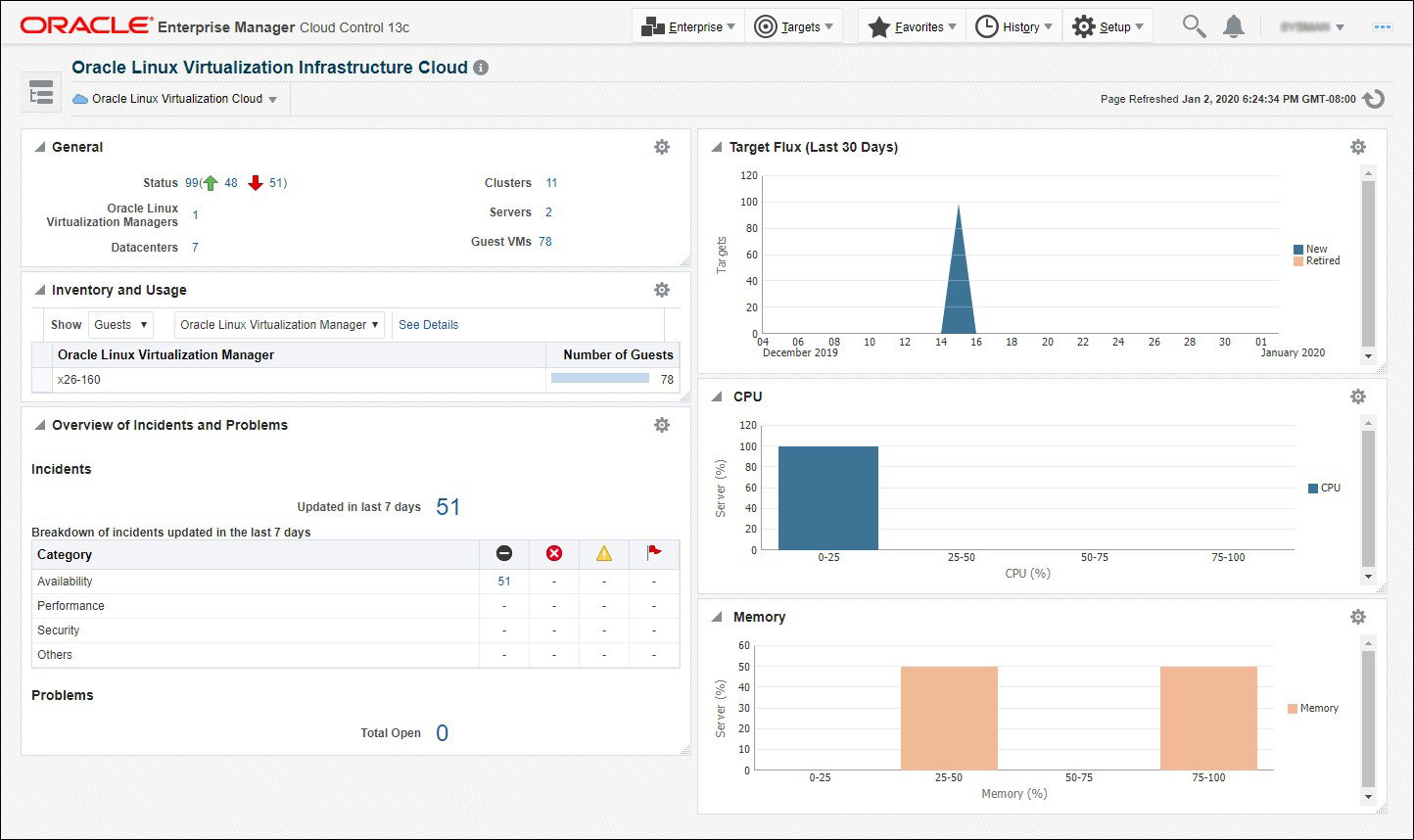
Its practical advantage is cost-conscious infrastructure modernization. Oracle’s virtualization stack can help teams avoid complex hypervisor licensing while still accessing enterprise support, disaster recovery capabilities, automation, and strong Oracle ecosystem compatibility. This makes it particularly useful for mission-critical workloads that need stability, security, and predictable support.
Pricing
Oracle promotes its virtualization software with no license cost. Organizations can use Oracle Linux freely and purchase support subscriptions for enterprise assistance and added services. Per Oracle's June 2026 Price List, Oracle Linux Premier Plus Support is priced at $2,499 per Physical CPU Pair per year (unlimited VMs per CPU pair included).
What Works & What Doesn’t
| Pros | Cons |
| KVM Foundation lowers licensing pressure | Smaller community than VMware |
| Strong Oracle workload compatibility | The web interface can feel dated |
| Support-backed Linux virtualization stack | Learning curve for new administrators |
Our Final Take
Oracle Linux Virtualization Manager is best suited for enterprises running Oracle Linux, databases, or application workloads. It may not suit teams wanting a broader third-party ecosystem, but it delivers strong value for Oracle-aligned data centers.
AWS: Best For Scalability
AWS brings virtualization to the data center conversation through Amazon Elastic Compute Cloud (EC2), the AWS Nitro System, and AWS Outposts. EC2 provides scalable cloud-based virtual servers, while Nitro offloads infrastructure functions to dedicated hardware and software. Outposts extend AWS infrastructure, services, APIs, and tools to on-premises locations for hybrid environments.
Why We Chose AWS In 2026
AWS stands out for organizations that want data center virtualization without being limited to traditional hardware refresh cycles. EC2 enables businesses to launch, resize, and retire compute capacity quickly, while Nitro improves performance, security isolation, and infrastructure efficiency. Outposts adds local AWS infrastructure for latency-sensitive, residency-focused, or migration-driven workloads.
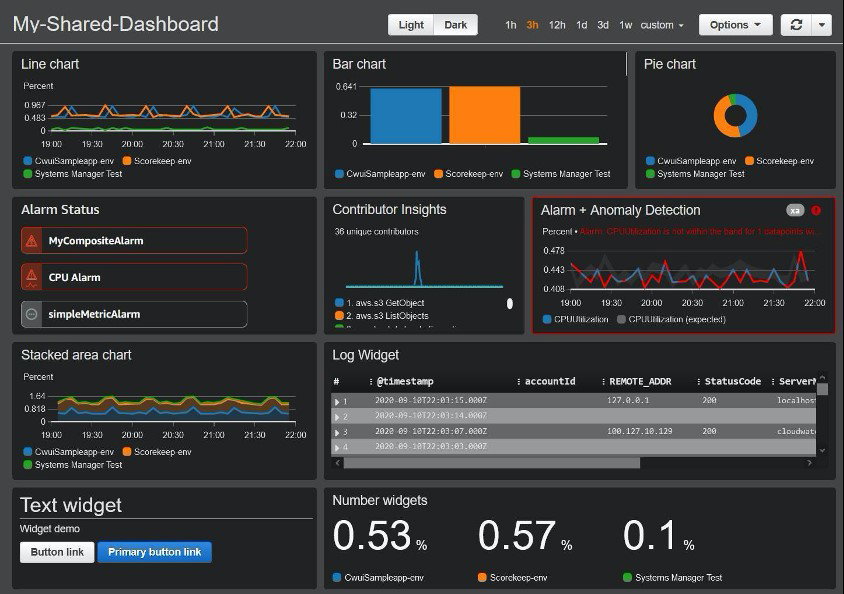
Its practical value is scalability. Teams can choose from many instance types, automate infrastructure with AWS, integrate storage and networking, and extend workloads across cloud and on-premises environments. This makes AWS especially effective for businesses modernizing gradually, bursting capacity, or standardizing hybrid operations around familiar AWS tools.
Pricing
Amazon EC2 uses pay-as-you-go On-Demand pricing with no long-term commitment required. Free Tier options and custom enterprise pricing may also apply.
What Works & What Doesn't
| Pros | Cons |
| Elastic capacity scales in minutes | Complex billing needs governance |
| Nitro improves security isolation | A networking setup can overwhelm beginners |
| Outposts extends AWS locally | Costs rise without active monitoring |
Our Final Take
AWS is best suited for organizations prioritizing elastic compute, hybrid expansion, and cloud-native operations. It may not be ideal for teams without cloud cost governance, but it offers unmatched scalability.
Topics For More Insights
Informatica: Best For Integration
Informatica Intelligent Data Management Cloud (IDMC) represents the data layer of modern data center virtualization. Now part of Salesforce after its 2025 acquisition, Informatica helps enterprises connect, manage, govern, and prepare data across hybrid and multi-cloud environments. Its platform emphasizes metadata intelligence, governance, integration, data quality, and AI-ready data operations.
Why We Chose Informatica In 2026
Informatica stands out because virtualized infrastructure is only useful when data remains accessible, trusted, and governed. IDMC helps organizations discover, integrate, cleanse, catalog, transform, and manage data across fragmented environments. Its CLAIRE AI capabilities automate data management tasks, while its large connection ecosystem helps unify enterprise data across applications, warehouses, lakes, and clouds.
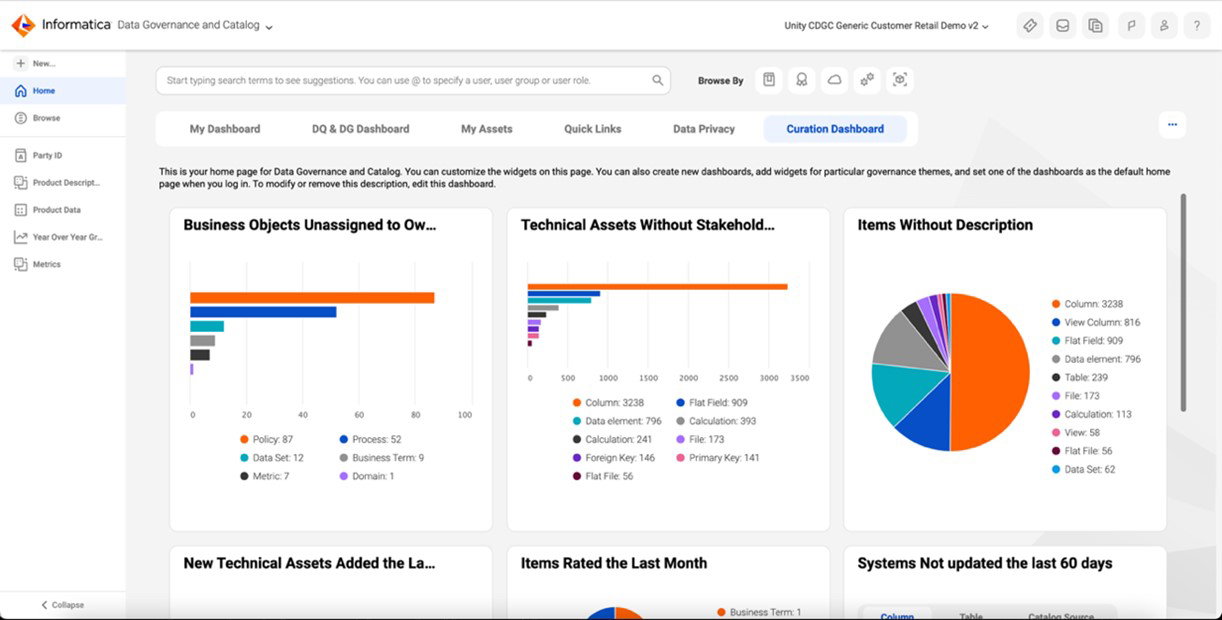
Its practical value is governance at scale. Informatica supports centralized control across distributed environments, helping organizations maintain data quality, compliance, lineage, and visibility. This makes it valuable for enterprises where virtualization includes not just compute abstraction but also governed access to data across complex digital infrastructure.
Pricing
Informatica IDMC uses a consumption-based IPU (Informatica Processing Unit) pricing model, where usage is prepaid annually and can be shifted across cloud services as needs evolve. No public per-unit pricing is listed; organizations are directed to contact Informatica (now Salesforce) for demos, product packaging, and implementation guidance.
What Works & What Doesn't
| Pros | Cons |
| Metadata-aware governance across environments | Pricing requires a sales consultation |
| CLAIRE AI automates data tasks | Beginners face a platform learning curve |
| Strong hybrid and multicloud connectivity | Connector setup may need expertise |
Our Final Take
Informatica is best suited for enterprises that need governed data access across a hybrid infrastructure. It is not a hypervisor, but it is a strong choice for data-driven virtualization strategies.
FME Platform: Best Customization
FME Platform by Safe Software is an enterprise integration and automation platform designed to connect, transform, and automate data across systems. It supports complex data workflows, including spatial data, cloud migration, application integration, and analytics pipelines. With recognition on G2 and strong ratings across review platforms, FME remains a valuable option for data-heavy virtualized environments.
Why We Chose FME Platform In 2026
FME Platform stands out for its no-code approach to enterprise data workflow automation. It allows users to build repeatable workflows across databases, geographic information systems, files, APIs, cloud services, and applications. With hundreds of transformers and broad format support, teams can reduce manual data movement and improve operational consistency across data center ecosystems.
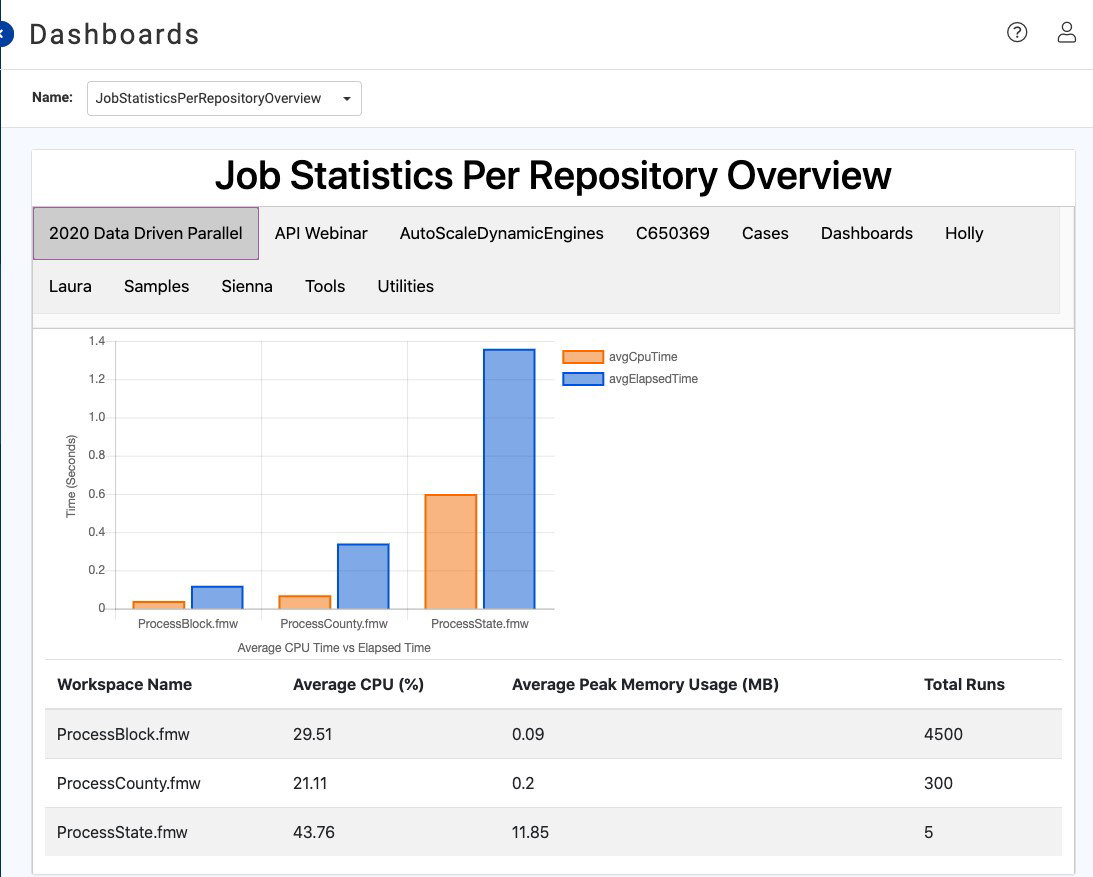
Its practical value is automation depth. FME helps teams orchestrate data transformations, validate information, move data between systems, and support analytics-ready pipelines without heavy coding. This is especially useful for organizations where infrastructure virtualization must be supported by dependable, automated, and reusable data workflows.
Pricing
FME Platform offers tailored subscription pricing through Safe Software. Capterra lists contact-vendor pricing and a free trial, while Safe also supports eligible education and nonprofit licenses.
What Works & What Doesn't
| Pros | Cons |
| No-code workflows accelerate integration | Complex workflows need discipline |
| Strong spatial data transformation depth | Resource-heavy for larger transformations |
| Broad connectors and transformer library | Pricing is quote-based |
Our Final Take
FME Platform is best suited for teams automating data workflows across virtualized and hybrid environments. It may be excessive for simple data movement, but it excels in complex integration use cases.
Top 5 Data Center Virtualization Software Comparison
P.S. Always remember to visit the vendor’s site for the latest information!
| Criteria |  |
 |
 |
 |
 |
| Starting Price | $135/year | $2,499/Year | $0.0052/hr | NA | NA |
| Avg. User Rating | 4.5 | 4.4 | 4.6 | 4.3 | 4.6 |
| Trial Period/Demo | Demo | Free Tier | Free Tier | Demo | 30-day Free Trial |
| Key Features | VMs, vMotion, and live patching | KVM, Ksplice zero-downtime patching, and DR | EC2, Nitro System, and Outposts | Governance, CLAIRE AI, and data integration | No-code workflows, spatial data, and automation |
| Integrations | Kubernetes, storage, networking, and more | Oracle Linux, KVM, OCI, and more | IAM, EBS, CloudWatch, and more | Salesforce, AWS, Azure, and more | GIS platforms, databases, APIs, and more |
Conclusion
There we have it, folks!
Data Center Virtualization Software in 2026 is really about choosing the right layer of your infrastructure to modernize. VMware vSphere and Oracle Linux Virtualization Manager help teams strengthen core virtualization. AWS extends compute flexibility across cloud and hybrid environments. Informatica and FME Platform bring that same modernization mindset to data governance, integration, and workflow automation.
The best choice depends on where your biggest challenge sits. Some organizations need better workload control, some need hybrid scalability, some want open-source virtualization, while others need trusted data movement or automated workflows.
Match the platform to your infrastructure strategy, and your data center starts feeling less like a hardware maze and more like a flexible digital engine built for what comes next.
Frequently Asked Questions
What Is Data Center Virtualization Software?
Data Center Virtualization Software helps businesses separate data center resources from fixed physical hardware. It allows IT teams to create and manage virtual machines, workloads, cloud capacity, governed data access, and automated workflows from centralized platforms, making infrastructure more flexible, scalable, and easier to control.
Which Is The Best Data Center Virtualization Software In 2026?
The best Data Center Virtualization Software in 2026 depends on your infrastructure goals. VMware vSphere is strong for mature workload virtualization, Oracle Linux Virtualization Manager is valuable for Oracle-aligned environments, AWS works well for scalable cloud and hybrid compute, while Informatica and FME Platform are better suited for data governance, integration, and workflow automation.
How Does Data Center Virtualization Software Help Businesses?
Data Center Virtualization Software helps businesses reduce hardware dependency, improve workload mobility, simplify infrastructure management, strengthen disaster recovery, and scale resources more efficiently. It also supports hybrid cloud operations, better resource utilization, and faster modernization without requiring constant physical infrastructure expansion.
Thu, Jun 4, 2026

Enjoyed what you've read so far? Great news - there's more to explore!
Stay up to date with the latest news, a vast collection of tech articles including introductory guides, product reviews, trends and more, thought-provoking interviews, hottest AI blogs and entertaining tech memes.
Plus, get access to branded insights such as informative white papers, intriguing case studies, in-depth reports, enlightening videos and exciting events and webinars from industry-leading global brands.
Dive into TechDogs' treasure trove today and Know Your World of technology!
Disclaimer - Reference to any specific product, software or entity does not constitute an endorsement or recommendation by TechDogs nor should any data or content published be relied upon. The views expressed by TechDogs' members and guests are their own and their appearance on our site does not imply an endorsement of them or any entity they represent. Views and opinions expressed by TechDogs' Authors are those of the Authors and do not necessarily reflect the view of TechDogs or any of its officials. While we aim to provide valuable and helpful information, some content on TechDogs' site may not have been thoroughly reviewed for every detail or aspect. We encourage users to verify any information independently where necessary.
Loading comments...