 Featured
Software Development
Top 5 Beta Testing Software Of 2026
Share
TL;DR
-
Centercode helps enterprises run structured beta programs and convert large-scale tester feedback into actionable insights.
-
BetaTesting connects teams with vetted real-world testers for usability validation and product feedback.
-
Luciq focuses on crash reporting, bug diagnostics, and mobile performance monitoring.
-
UserTesting enables teams to capture real-user video feedback across customer journeys and prototypes.
-
TestFlight simplifies secure beta distribution and feedback collection for iOS and Apple ecosystem apps before release.
Introduction
Do you watch movies regularly?
Maybe you’re the type who pauses trailers frame by frame, trying to catch hidden details before release day.
Recently, when Christopher Nolan dropped the trailer for The Odyssey, fans immediately started dissecting every shot online, building theories, spotting clues, and debating what the movie might still be hiding. Despite all that analysis, audiences will probably still discover surprises once the full film finally releases.
Product launches work the same way. No matter how polished something looks internally, real users almost always uncover issues, edge cases, and usability problems the team did not notice during development.
That is where beta testing software comes in. These platforms help companies test products with real users before launch, making it easier to identify bugs, performance gaps, crashes, and workflow friction before the product reaches a wider audience.
Before we dive into the Beta Testing Tools list, let’s understand what beta testing software actually is.
What Is Beta Testing Software?
Beta testing software helps companies test near-finished products with real users before releasing them to the wider market. These platforms allow teams to distribute beta builds, recruit or invite testers, collect bug reports, capture screenshots and crash logs, gather usability feedback, and track feature requests from one centralized system.
Unlike internal QA testing, beta testing exposes products to real-world conditions, different devices, user behaviors, network environments, and unexpected usage patterns that are difficult to fully simulate internally. That outside feedback often reveals issues teams simply do not notice during development.
For product, engineering, QA, and UX teams, beta testing software becomes a way to validate assumptions, prioritize fixes, improve user experience, and launch with far greater confidence.
Now, let’s get into the list we’re all here for: the Top 5 Beta Testing Software solutions of 2026.
Top 5 Beta Testing Software of 2026
Before a product wins the market, it has to survive real users, real devices, and real-world expectations. Here are the top beta testing tools of 2026 that help teams uncover issues early, validate experiences faster, and launch with confidence.
 |
 |
 |
 |
 |
Centercode: Best Overall
Some teams treat beta testing like a quick feedback round before launch. Others run it almost like a structured product operation with tester recruitment, engagement workflows, and performance validation. Centercode is very clearly built for the second scenario.
Founded in 2001, the platform focuses entirely on beta testing and user validation programs, supporting everything from tester onboarding to structured feedback analysis. The company reports a tester community of roughly 200,000 users and positions itself heavily around enterprise-scale beta management for technology, SaaS, and hardware teams running repeatable testing cycles.
Why We Chose Centercode In 2026
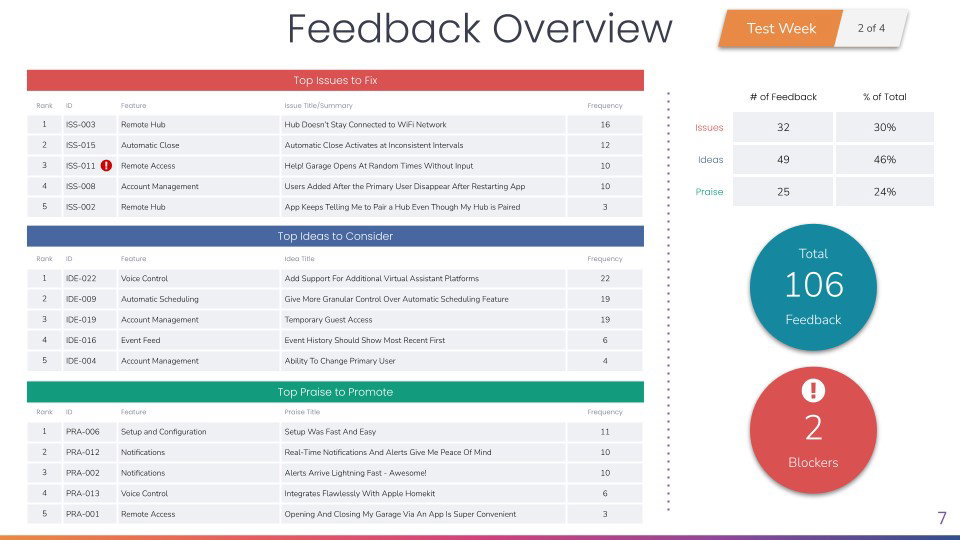
Centercode feels less like a lightweight feedback collection tool and more like a full operational system for managing beta programs from beginning to end. Teams can recruit testers, organize test plans, automate engagement workflows, collect structured reports, and convert user feedback into measurable insights without relying on multiple disconnected systems.
Its newer Centercode 10x release expanded the platform further through AI-assisted automation, video feedback workflows, mobile app distribution, and stronger analytics capabilities. That additional depth makes the platform particularly attractive for organizations handling large-scale testing environments where coordination and reporting can become difficult very quickly.
Another major strength is operational maturity. Beyond testing workflows themselves, the platform includes enterprise-oriented controls such as SOC 2 Type II compliance, penetration testing practices, and PII deletion support. That level of structure makes it noticeably more enterprise-ready than many lighter beta testing tools focused primarily on app distribution or usability feedback alone.
Pricing
Centercode typically offers a free starter option for smaller teams. Professional plans generally begin around $2,000/month, while larger Team-oriented deployments start near $4,000/month, depending on user capacity, automation requirements, and testing scale.
What Works And What Doesn’t
| Pros | Cons |
| Strong centralized beta management | Initial setup can feel complex |
| Excellent tester engagement workflows | Multi-language support remains limited |
| Detailed reporting and analytics | The reporting interface could feel more modern |
Our Final Take
Centercode works especially well for enterprise technology teams managing structured beta programs across multiple launches, devices, or user groups. Smaller teams looking for lightweight feedback collection may find the platform more robust than necessary, but for organizations prioritizing scalability, automation, tester engagement, and operational control, it remains one of the strongest dedicated beta testing platforms available in 2026.
BetaTesting: Best For Small Business
Sometimes, the hardest part of beta testing is not collecting feedback; it is actually finding the right people willing to test the product in the first place. BetaTesting leans heavily into solving that exact problem by combining tester recruitment, usability testing, and product validation into one managed platform.
The company says it provides access to more than 450,000 vetted testers globally, along with millions of additional participants through research partnerships spanning over 150 countries. Its visibility also continued growing after recognition in G2’s 2025 reports across crowd testing and software testing categories, particularly for usability and ease of setup.
Why We Chose BetaTesting In 2026
BetaTesting stands out because it lowers the operational barrier to running real-world product tests. Smaller teams often do not have dedicated research departments, internal testing communities, or large QA operations, which makes fast participant recruitment incredibly valuable when timelines are tight before launch.
The platform combines tester sourcing, usability studies, bug reporting, surveys, incentives, and video feedback into one workflow instead of forcing teams to coordinate multiple disconnected tools. That simplicity makes it especially approachable for startups, growing SaaS companies, and smaller product teams trying to validate products quickly without building an entire research infrastructure internally.
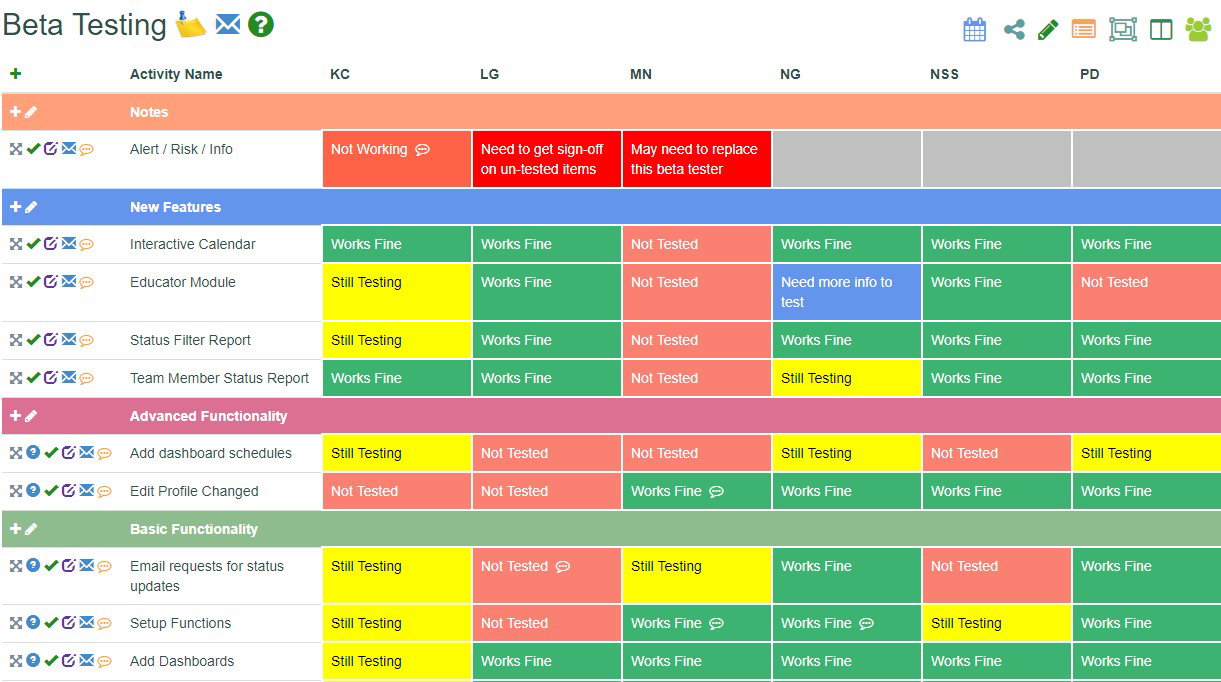
Another strength is flexibility. Teams can target testers based on demographics, devices, industries, and behaviors while collecting structured feedback across apps, websites, and digital products. Combined with managed-service support and enterprise-oriented security features like SOC 2 Type II compliance, MFA, SSO, encryption, and GDPR support, the platform balances accessibility with operational maturity surprisingly well.
Pricing
BetaTesting pricing generally starts at $170/month for standard plans, while enterprise deployments can exceed $20,000 annually depending on participant scale, project complexity, and testing requirements.
One-time project credit options are also available for teams that do not need ongoing subscriptions.
What Works And What Doesn’t
| Pros | Cons |
| Easy onboarding and setup | Tester compensation concerns occasionally arise |
| Fast project deployment | Credit systems can feel restrictive |
| Strong customer support | Some reports may lack deeper analytical depth |
Our Final Take
BetaTesting works especially well for smaller teams and growing businesses that need fast access to real-world testers without building large internal research operations. Organizations requiring heavily automated engineering-focused QA pipelines may outgrow parts of the platform, but for usability validation, feedback collection, and pre-launch product testing, it remains one of the more approachable solutions in this category.
Luciq: Best Mobile Functionality
Mobile apps fail differently from desktop or web products. A feature might work perfectly during internal testing and still break under weak network conditions or older devices. Luciq was built specifically around helping mobile teams catch those problems before they spiral into poor reviews and frustrated users.
Previously known as Instabug before its 2025 repositioning, Luciq now focuses heavily on mobile observability, beta testing, crash diagnostics, and AI-assisted issue detection. The company says its SDK runs across more than 4.2 billion devices globally, supporting over 25,000 companies and teams while processing hundreds of millions of reported issues. Its enterprise momentum has also continued growing through recognition in G2 categories spanning Mobile APM, Bug Tracking, and Mobile DevOps.
Why We Chose Luciq In 2026
Luciq stands out because it combines multiple mobile workflows into one tightly integrated system. Instead of forcing teams to jump between separate bug-reporting tools, crash analytics platforms, and performance monitoring systems, Luciq brings reporting, diagnostics, observability, and beta feedback together inside one mobile-focused workflow.
One of its most recognizable features remains the classic “shake-to-report” functionality, which honestly still feels oddly satisfying to use even years later. Testers can instantly capture screenshots, logs, device context, session data, and feedback directly inside the app while problems are happening instead of trying to recreate issues later from memory.
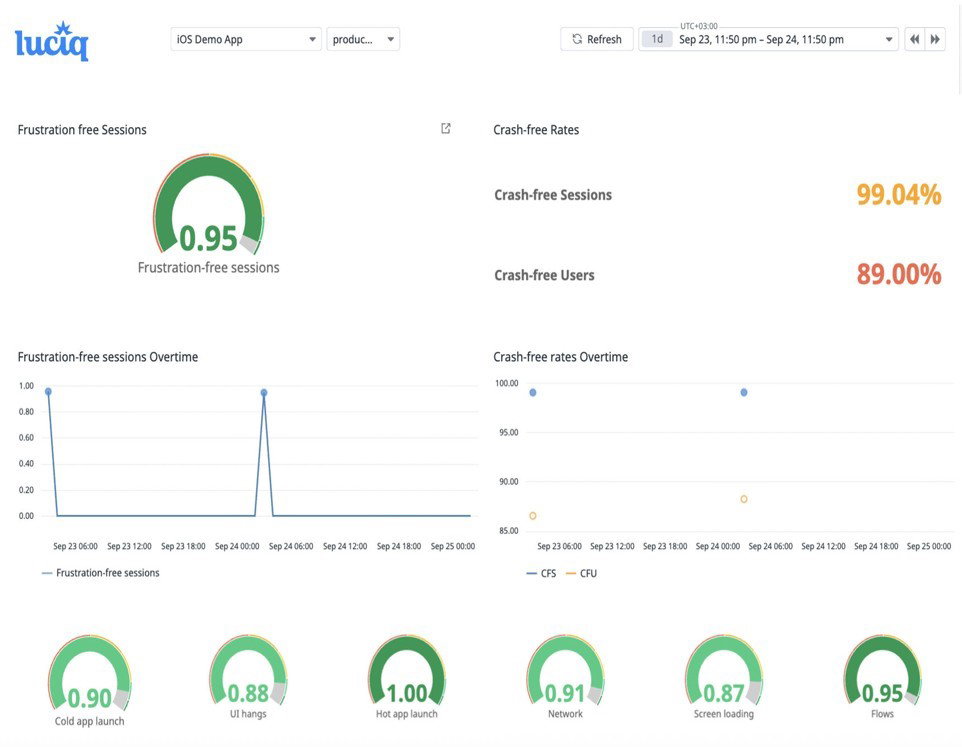
The platform also layers session replay, network monitoring, release tracking, crash reporting, and AI-assisted prioritization to help developers identify which issues are actually affecting user experience most severely. Combined with integrations across tools like Jira and Datadog, Luciq fits naturally into modern mobile engineering pipelines.
Pricing
Luciq uses a usage-based pricing structure centered around Daily Active Users (DAU) rather than charging per session or log volume. Enterprise pricing is customized based on product scale, observability requirements, and deployment complexity.
What Works And What Doesn’t
| Pros | Cons |
| Intuitive mobile-focused workflows | Some users report memory-related issues |
| Fast crash and bug detection | Occasional processing delays |
| Strong contextual diagnostics | Pricing may feel expensive for smaller teams |
Our Final Take
Luciq is one of the best Beta Testing Tools for teams that need deeper visibility into crashes, performance issues, and real-world user behavior. Organizations focused primarily on desktop software may not fully benefit from its specialization.
UserTesting: Best User Experience
Sometimes, the most painful product feedback is watching a real user struggle with something your internal team thought was completely obvious. UserTesting is built around capturing those moments before they become expensive customer problems.
The platform focuses heavily on human-centered research and experience validation, helping product, UX, marketing, and customer experience teams test websites, apps, messaging, prototypes, and digital workflows with real participants at scale.
Following its acquisition by private-equity firms Thoma Bravo and Sunstone Partners, along with its merger with UserZoom, UserTesting strengthened its position as one of the larger enterprise-focused UX research platforms in the market.
Why We Chose UserTesting In 2026
UserTesting stands out because it focuses less on technical QA workflows and more on understanding human behavior during product interaction. Instead of simply identifying bugs, the platform helps teams observe how real users navigate products, react emotionally, interpret messaging, and experience friction across digital journeys.
Its research toolkit includes moderated and unmoderated testing, live interviews, click maps, sentiment analysis, prototype validation, path analysis, and AI-assisted insight summaries. Video feedback remains one of the platform’s biggest differentiators because watching users think out loud while interacting with a product often reveals usability issues that raw analytics alone completely miss. Honestly, sometimes five minutes of watching someone struggle through a workflow can change an entire design decision faster than weeks of internal debate.
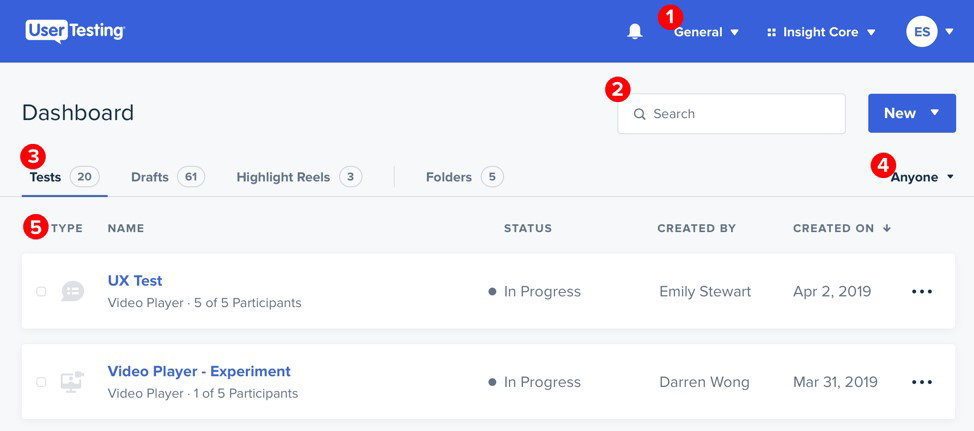
The platform also supports large-scale participant recruitment, research repositories, enterprise integrations, and customer experience analysis across multiple business functions. Combined with strong customer support and enterprise-grade operational controls, UserTesting fits especially well inside mature UX and experience-research environments.
Pricing
UserTesting does not publicly publish fixed pricing tiers. Enterprise contracts generally begin around $15,000–$40,000 annually, while individual session costs can range from approximately $49–$100 per test session, depending on research complexity, participant targeting, and platform features.
What Works And What Doesn’t
| Pros | Cons |
| Rich qualitative user feedback | Premium pricing structure |
| Fast access to participant insights | Reviewing sessions can become time-intensive |
| Strong combination of qualitative and quantitative data | Limited control over external testing environments |
Our Final Take
UserTesting works especially well for enterprises prioritizing UX research, customer experience validation, messaging refinement, and insight-driven product decisions at scale. Teams looking mainly for low-cost bug tracking or engineering-focused QA workflows may find the platform broader than necessary, but for organizations that are trying to understand how real users experience their products, few platforms deliver this level of human-centered visibility.
TestFlight: Best Value
If you have ever tested an iPhone app before launch, chances are you have already used TestFlight without even thinking much about it. It has quietly become the default beta distribution layer across Apple’s ecosystem, sitting directly inside App Store Connect.
Originally developed by Burstly before being acquired by Apple in 2014, TestFlight now supports beta distribution across iOS, iPadOS, macOS, tvOS, watchOS, visionOS, and App Clips. The platform allows developers to manage up to 100 internal testers and 10,000 external testers per application, making it one of the most widely adopted beta workflows in Apple development environments.
Why We Chose TestFlight In 2026
TestFlight stands out because it removes an enormous amount of operational friction from Apple-focused beta testing. Distribution, tester invitations, crash reporting, usage insights, and feedback collection all happen inside Apple’s native ecosystem.
Developers can invite testers through public links or email, manage build access directly from App Store Connect, and collect real-world feedback before public release without needing separate infrastructure. For Apple-platform apps specifically, native integration is honestly difficult to beat because everything already works within the ecosystem that developers are using daily.
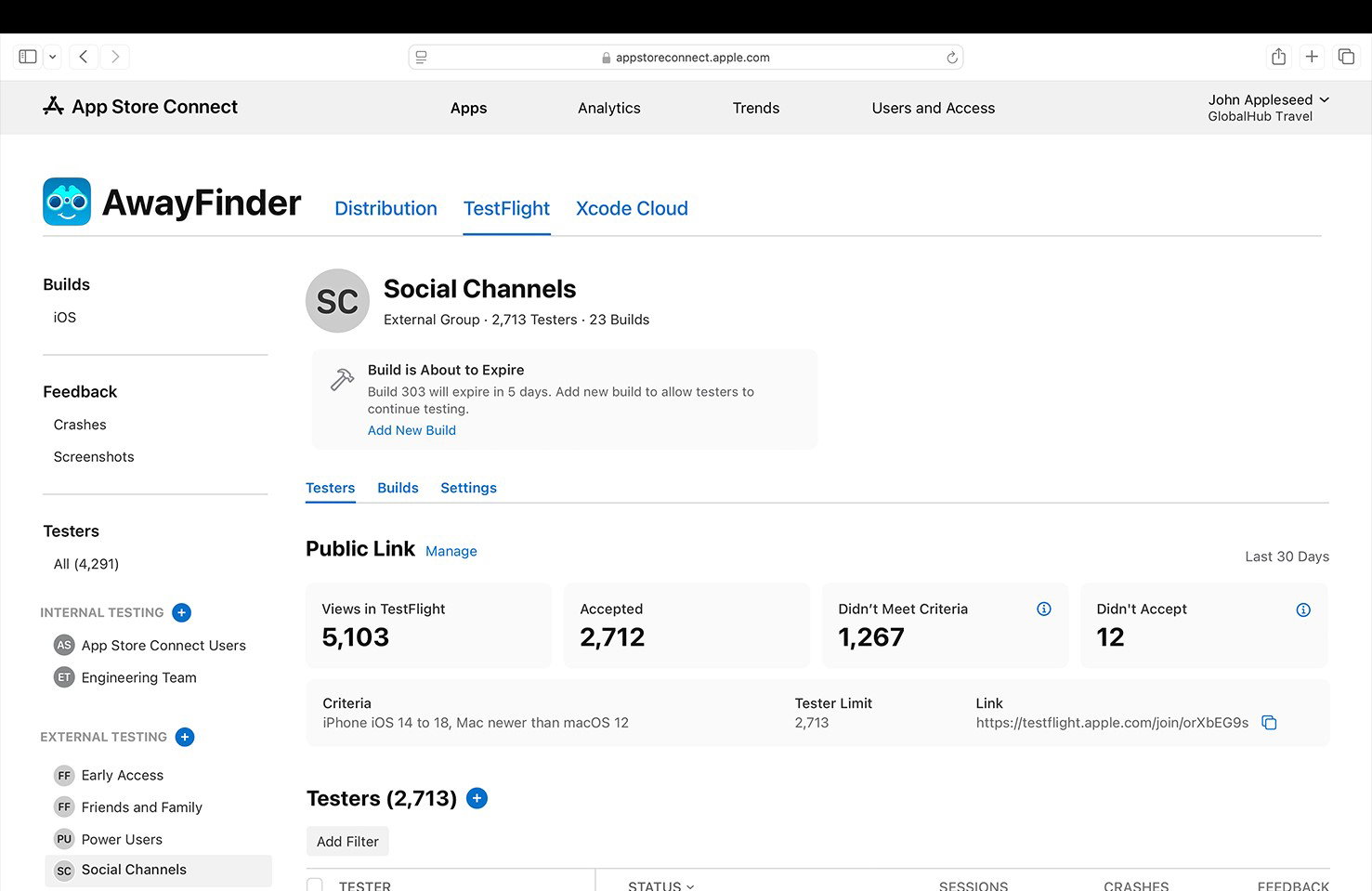
The platform also benefits from being tightly aligned with Apple’s release workflows and device environments. Crash logs, tester feedback, and usage insights flow directly into the development pipeline while maintaining Apple’s security and distribution controls. The tradeoff, of course, is that TestFlight remains heavily Apple-centric and does not try to become a broader cross-platform research or QA management solution.
Pricing
TestFlight is free for testers, downloading and evaluating beta applications. Developers do not pay a separate TestFlight fee, although participation requires membership in the Apple Developer Program, which costs approximately $99/year for individuals and $299/year for organizations.
What Works And What Doesn’t
| Pros | Cons |
| Native Apple ecosystem integration | Feedback workflows remain fairly basic |
| Simple tester distribution workflows | Builds expire automatically |
| Reliable real-world crash reporting | Limited to Apple platforms |
Our Final Take
TestFlight works especially well for teams building products exclusively within Apple’s ecosystem. Organizations requiring advanced research analytics, cross-platform testing management, or large managed tester communities may eventually outgrow its scope.
Top 5 Beta Testing Software Comparison
To identify the most effective beta testing solution, this side-by-side comparison evaluates the top five platforms across usability, scalability, advanced features, security, pricing, customer support, and enterprise suitability.
| Criteria |  |
 |
 |
 |
 |
| Starting Price | $2,000/month | $170/month | NA | $49/session | $99/year |
| Avg. User Rating | 4.3 | 4.7 | 4.3 | 4.4 | 4.2 |
| Free Trial/Demo | Demo | NA | 14 days | Demo | Demo |
| Key Features | Automated workflows, structured feedback, and advanced integrations | Survey deployment, trigger alerts, and real-time analysis | Visual session replays, rich bug and crash reports, and in-app tester communication | On-demand global panel, live interviews, and AI-powered insights | Flexible distribution, crash reporting, and detailed metrics |
| Integrations | Jira, Slack, Salesforce, and more | Jira, Trello, Slack, and more | GitHub, GitLab, Bitbucket, and more | Adobe XD, InVision, Canva, and more | Fastlane, GitHub, Firebase, and more |
Wrapping Up
Choosing the right beta testing software in 2026 depends on your product type, team maturity, testing goals, and budget. While some platforms excel at real-user feedback and UX validation, others stand out for mobile observability, Apple-native distribution, enterprise scalability, or managed testing support.
The best choice is the one that helps your team uncover issues earlier, validate user expectations faster, and launch with greater confidence.
Frequently Asked Questions
What Is Beta Testing Software Used For?
Beta testing software helps companies test products with real users before public release. These platforms allow teams to distribute beta builds, collect bug reports, monitor crashes, gather usability feedback, and identify performance issues in real-world environments before launch.
Which Is The Best Beta Testing Software In 2026?
The best beta testing software depends on the type of product and testing workflow you need. Centercode is strong for structured enterprise beta programs, while BetaTesting focuses on fast access to real-world testers. Mobile teams often prefer Luciq, while TestFlight remains one of the best options for Apple ecosystem apps.
Why Is Beta Testing Important Before Product Launch?
Beta testing helps businesses identify bugs, usability issues, crashes, compatibility problems, and user-experience friction before products reach the wider market. Testing with real users allows product, UX, QA, and engineering teams to validate assumptions, improve stability, and launch with greater confidence.
Wed, May 13, 2026

Enjoyed what you've read so far? Great news - there's more to explore!
Stay up to date with the latest news, a vast collection of tech articles including introductory guides, product reviews, trends and more, thought-provoking interviews, hottest AI blogs and entertaining tech memes.
Plus, get access to branded insights such as informative white papers, intriguing case studies, in-depth reports, enlightening videos and exciting events and webinars from industry-leading global brands.
Dive into TechDogs' treasure trove today and Know Your World of technology!
Disclaimer - Reference to any specific product, software or entity does not constitute an endorsement or recommendation by TechDogs nor should any data or content published be relied upon. The views expressed by TechDogs' members and guests are their own and their appearance on our site does not imply an endorsement of them or any entity they represent. Views and opinions expressed by TechDogs' Authors are those of the Authors and do not necessarily reflect the view of TechDogs or any of its officials. While we aim to provide valuable and helpful information, some content on TechDogs' site may not have been thoroughly reviewed for every detail or aspect. We encourage users to verify any information independently where necessary.
Loading comments...