Consumer Electronics Technology
reMarkable Paper Pure: Complete Beginners Guide
Share
TL;DR
-
The reMarkable Paper Pure replaces the reMarkable 2 lineup and is the company’s most affordable third generation writing tablet.
-
It is a focused e-paper device built for writing, note-taking, and reading with a paper-like experience.
-
It offers long battery life, simple tools, and an uncluttered interface for distraction-free use.
-
It has no color display, no backlight, no Type Folio support at launch, and comes with a black-and-white screen only.
-(1)-292.jpg.aspx "TechDogs-\"reMarkable Paper Pure: Complete Beginners Guide\"")
Introduction
There is a strange comfort in writing things down. A quick meeting note, a rough idea, a grocery list you may or may not follow, or a sentence that suddenly appears in your head while you are doing something unrelated. Paper has always been good at holding onto these small thoughts before they disappear.
Even today, when almost everything is digital, many people still instinctively reach for a notebook when they want to think clearly. Not because technology fails, but because typing and writing rarely feel the same, where one is fast, the other feels personal.
At the same time, modern life has changed how we manage information. Notes now move between work, home, phones, laptops, and endless apps. Some ideas stay in notebooks, while others get lost in folders we rarely reopen. Somewhere between paper comfort and digital convenience, devices like the reMarkable Paper Pure have found their place.
It doesn’t try to be a traditional tablet full of distractions. Instead, it focuses on recreating the simple experience of writing while keeping everything organized digitally.
For anyone curious about digital paper tablets or how E Ink devices fit into everyday life, this reMarkable paper pure guide walks through it in a simple, practical way. Read on!
What Is reMarkable Paper Pure?
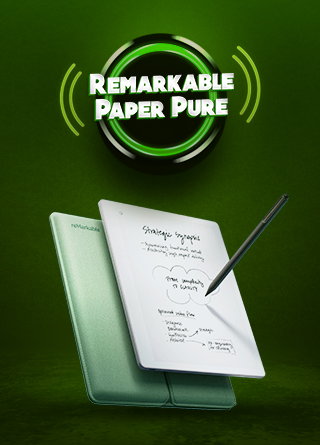
The reMarkable Paper Pure is basically a digital notebook that feels surprisingly close to real paper. It’s a black-and-white e-paper tablet made for people who want to write, read, sketch, and organize notes without getting pulled into apps, notifications, or endless scrolling.
According to reMarkable, the Paper Pure replaces the earlier reMarkable 2 lineup and is positioned as the company’s most affordable third-generation writing tablet.
Unlike an iPad or Android tablet, it doesn’t try to do everything. No social media, no games, no distractions. It’s intentionally simple and almost like it’s designed to get out of your way so you can actually think.

reMarkable calls it a bridge between a traditional notebook and a digital workspace, and that description fits well. You write on it the same way you would on paper, but your notes can be stored, searched, organized, and synced digitally whenever you need them.
On the specs side, it has a 10.3-inch e-Ink display (Carta 1300), a resolution of 1872 × 1404, and a lightweight build of around 360g. It’s just 6mm thin, with 32GB storage and 2GB RAM.
Honestly, the numbers aren’t the point. What matters is how it feels. Just like a space made purely for your thoughts, without anything competing for them.
Who Is reMarkable Paper Pure For?
This is probably the most important question before buying.
The reMarkable Paper Pure is not meant for everyone. It is for people who spend a lot of time writing, planning, annotating, or thinking visually, and want a more focused way to do it.
It makes the most sense for students who take handwritten notes, writers and researchers who work through ideas on paper, professionals who sit through daily meetings, and anyone trying to cut down on screen distractions. It also works well for journal keepers, planners, readers who frequently annotate PDFs, and creatives who like sketching rough concepts or visual ideas.
Well, if you prefer color, video, apps, a browser-first experience, or a full tablet replacement, this will feel too limited. WIRED notes that the Paper Pure has no front light, no color, and no keyboard folio support at launch, which makes it more focused but also less flexible.
So, the target audience is clear. This digital slate is for people who want fewer distractions and not more features.
What Makes The Paper Pure Different From A Regular Tablet?
The biggest difference is intentional simplicity.
A normal tablet tries to do everything. The Paper Pure deliberately avoids that approach.
The experience is created around writing. The screen has minimal glare, the battery lasts longer than standard tablets, and the interface stays clean without endless notifications pulling attention away.
According to GamesRadar, the device has faster page turns, improved contrast, and better responsiveness than earlier reMarkable models. That focused approach is why many users searching for the best e-ink tablet for writing in 2026 are paying attention to this device.
That’s where its contrast with regular tablets really starts to show.
What Are The Features Of reMarkable Paper Pure?
The real idea behind the reMarkable Paper Pure becomes clear when you look at its features.
Design And Writing Feel
The first question most beginners have is simple. Does it actually feel like paper?
On paper (no pun intended), the reMarkable Paper Pure is built to get as close to that feeling as possible. It uses a paper-like textured glass surface, palm rejection, and a reduced pen-to-ink distance of around 0.8mm. That small gap between the pen tip and the digital ink is what makes a big difference.
The surface itself has just enough texture and resistance so your stylus doesn’t glide around like it would on a smooth tablet. With quick response times, your handwriting shows up almost instantly, which keeps the experience feeling natural and uninterrupted.
Writing Tools And Templates
The reMarkable Paper Pure includes nine writing tools, such as pens, pencils, and highlighters, giving you flexibility in how you take notes. It also supports editing actions like cut, copy, paste, move, resize, rotate, and undo, making handwritten notes easier to refine and structure.
A key feature is handwriting-to-text conversion in over 30 languages, powered by MyScript, allowing you to turn handwritten notes into clean, editable text when needed.

For organization, it offers folders, tags, and templates like weekly planners, to-do lists, lined pages, grids, and notebook styles to help you structure notes or plan your week in different ways.
Productivity And Smart Note Features
A key feature is handwriting-to-text conversion in over 30 languages, powered by MyScript to turn handwritten notes into clean, editable text when needed.
It also includes calendar-based meeting notes, where the date and attendees can be auto-filled from your calendar. The idea is to stay focused on the meeting while the device takes care of the structure.
Collaboration, Integrations, And Sharing
The tool supports Screen Share so you can mirror your tablet on a larger display and use it like a live whiteboard for presenting or discussing ideas.


For connectivity, it works with Google Drive, OneDrive, and Dropbox, and also allows you to import web articles and Word documents through the Read on reMarkable extension. With a Connect subscription, you get additional tools like sending notes directly to Slack and Miro, along with benefits such as unlimited cloud storage, extra templates, and access across devices.
You can also import PDF and EPUB files, and export your work in formats like PDF, PNG, or SVG. To keep everything accessible, companion apps are available for macOS, Windows, iOS, and Android, so your notes move with you across devices without friction.
Battery Life And Everyday Use
One reason people look for the best e-ink tablet for writing in 2026 is battery life. A normal tablet often needs charging every day or two. E-ink devices are usually calmer about power.
The Paper Pure has a 3,820 mAh battery, and reMarkable lists battery life at up to three weeks on one charge. It also claims that the Paper Pure has improved battery performance compared to the reMarkable 2’s two-week battery life and charges from 0 to 90% in about 75 minutes.
Basically, you can take it to class, work, meetings, or travel without thinking about the charger constantly. That is a big part of the appeal of an entry-level paper tablet that should feel closer to a notebook than another device asking for attention.
Now that everyday usage is clear, the next thing to look at is Type Folio compatibility and whether it really matters.
Is the reMarkable Paper Pure Type Folio Compatibility Worth It?
When people first hear about the reMarkable Paper Pure, most of the attention naturally goes to handwriting. There’s another layer that quietly changes how the device can be used in everyday work: the Type Folio. For those new to it, the Type Folio is a keyboard cover that attaches to the device so you can type directly into your notes instead of only writing by hand.
For long documents, articles, or meeting notes, it helps. You can start by writing rough ideas by hand, then switch to typing when things need to look cleaner or easier to share. However, it’s not meant to act like a laptop. It stays minimal on purpose and maintains the focus on writing and thinking.
One important thing to note is that reMarkable Paper Pure type folio compatibility is limited. At launch, the Paper Pure does not appear to support a Type Folio keyboard. WIRED specifically notes that the Paper Pure only has a protective folio option and does not have the keyboard folio support available with reMarkable 2 or Paper Pro.
For pure handwriting, though, the lack of keyboard support may not matter at all.
What Is The Price Of reMarkable Paper Pure?
The reMarkable Paper Pure price depends on market and bundle, but the official U.S. shop listing showed the Paper Pure starting from $399. The standard box includes the Paper Pure, Marker, a 1-meter USB-C cable, and six replacement marker tips. reMarkable also sells a bundle with Marker Plus and a Folio option.
For beginners, the real price question is not only “Can I afford the tablet?” It is also “Do I need the extras?” The Marker Plus adds an eraser, and a folio gives protection. If you carry the tablet every day, the folio will probably matter. If you mostly use it at a desk, the basic setup may be enough.
Well, beyond the price tag, what matters most is whether it fits your needs at all.
Is the reMarkable Paper Pure Worth It? Pros And Cons Explained


Before you decide whether it fits your workflow, it’s worth seeing where the reMarkable Paper Pure truly adds value and where it falls short.
| Pros | Cons |
| Very simple, distraction-free writing space | No backlight, so hard to use in the dark |
| Feels like writing on real paper | No color display |
| Long battery life | Not ideal for drawing or color-heavy work |
| Lightweight and easy to carry | No Type Folio support |
| Good storage for notes and files | Some features need a paid Connect plan |
| Helps keep notes organized in one place | Cannot replace a full laptop or tablet |
In the end, it also comes down to personality. Some people are perfectly happy in a calm black-and-white space, while others may miss the depth and expression that color brings.
Final Thoughts
In a world where every device is trying to multitask its way into your attention, the reMarkable Paper Pure quietly sticks to its own personality. It doesn’t try to be your entertainment hub. Instead, it behaves more like that calm desk corner you keep going back to when your brain needs to breathe.
It won’t wow you with color, but it does something rarer by slowing things down just enough for your thoughts to catch up. Honestly, in today’s chaos of pings and pop-ups, that’s not just useful. It’s useful, in a way that stands apart from the usual noise of modern digital clutter.
Frequently Asked Questions
What Is reMarkable Paper Pure Used For?
reMarkable Paper Pure is used for handwritten notes, PDF markup, reading, journaling, and paperless notetaking. It is made for users who want a focused digital paper tablet without regular tablet distractions.
Is reMarkable Paper Pure Good For Beginners?
Yes, reMarkable Paper Pure is beginner-friendly because it keeps the writing experience simple. It suits students, professionals, writers, and anyone moving from paper notebooks to an e-paper slate.
Is reMarkable Paper Pure The Best E-Ink Tablet For Writing In 2026?
reMarkable Paper Pure can be among the best e-ink tablets for writing in 2026 if you want a clean, distraction-free handwriting device. However, it is not the best choice if you need a color screen, regular apps, or a keyboard for typing.
Fri, May 29, 2026

Enjoyed what you've read so far? Great news - there's more to explore!
Stay up to date with the latest news, a vast collection of tech articles including introductory guides, product reviews, trends and more, thought-provoking interviews, hottest AI blogs and entertaining tech memes.
Plus, get access to branded insights such as informative white papers, intriguing case studies, in-depth reports, enlightening videos and exciting events and webinars from industry-leading global brands.
Dive into TechDogs' treasure trove today and Know Your World of technology!
Disclaimer - Reference to any specific product, software or entity does not constitute an endorsement or recommendation by TechDogs nor should any data or content published be relied upon. The views expressed by TechDogs' members and guests are their own and their appearance on our site does not imply an endorsement of them or any entity they represent. Views and opinions expressed by TechDogs' Authors are those of the Authors and do not necessarily reflect the view of TechDogs or any of its officials. While we aim to provide valuable and helpful information, some content on TechDogs' site may not have been thoroughly reviewed for every detail or aspect. We encourage users to verify any information independently where necessary.
Loading comments...