UI and UX
Everything You Need To Know About Heatmap Software
Share
Overview
Of course, we’re talking about the masked superhero vigilante Batman. We love Batman, don’t we? (We bet even the Marvel movie fans are nodding in agreement!). Why not; he had some of the most insane superhero technologies we’ve ever seen. The Batmobile, Grapple Gun and especially the Bat-Sonar Lenses. These super cool glasses used sonar to help Batman locate criminals or map his surroundings. We saw how handy it was in Batman Begins, right?
Imagine you want this superpower in your day-to-day routine. If you’re a marketer, you could see the users’ hot spots on your website or app or even the physical retail store. You could also uncover the most frequented spots that users are clicking, highlighting or interacting with. By understanding the activities, you gain valuable insights into the behavior of your audience.
That’s what Heatmap Software does! This software can optimize your website, webpage or app and make it more user-friendly. You can drive more personalized interactions, which can increase conversions and keep your users coming back for more.
So, put on your mask and cape - we're uncovering the power of Heatmap Software!
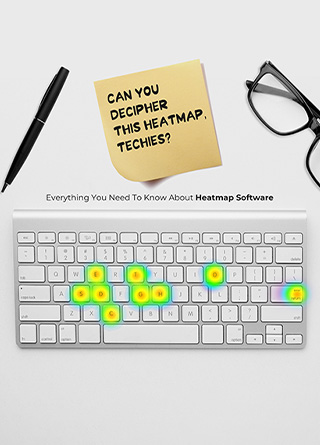
.jpg.aspx "TechDogs-\"TechDogs-\"Everything You Need To Know About Heatmap Software\" Can You Decipher This Heatmap, Techies?")
Have you ever wondered how online stores analyze your choice and preference for clothing items? We mean, they give you the best and most relevant suggestions every time you visit the website, right? Amazon does this with its visitors by showing them products they may be interested in. Not only Amazon, even Shopify and other Ecommerce platforms keep a track of what you are buying, looking for and interacting with to give you more personalized suggestions.
How do these companies do that? Simple, it's all about the right user analysis. Sure, it can be tracking what you’re searching or webpages you visit – but how about tracking the spot where you are staying longer on the web page? That's exactly what Heatmap Software does! (Yes, even if your mouse cursor is on the non-clickable areas, this tool knows what you are doing!)
Needless to say, the use of Heatmap Software is helping boost conversions, drive revenues and personalization strategies.
So, what exactly is Heatmap Software? Let’s learn everything about it.
What Is Heatmap Software?
Do you know every time you are visiting a website, someone is tracking your movement throughout the screen? No, not Big Brother! It is Heatmap Software. In simpler words, it is a behavior analytics tool that helps in understanding how a visitor interacts on webpages, applications or other interfaces.
The reasons are also simple. Companies do this to understand how you are interacting with the website, if you’re dealing with issues or whether you are reacting to new content on the webpage. Hence, such software usually tracks everything, from user interactions with the main elements on the page to clicks on CTAs, opt-ins or any other button.
Sure, the heatmap is not the hottest new technology (pun intended!) - so who had the idea to come up with something like this in the first place? Let’s figure that out!
Where Did Heatmap Software Come From?
Back in the 19th century, heatmaps were like the cool new haircut at the barbershop that everyone wanted. Everyone was talking about them and wanted to try them out. They first appeared in the 1800s and by the 1900s were the hottest new way to show off data and understand which area has more reactions.
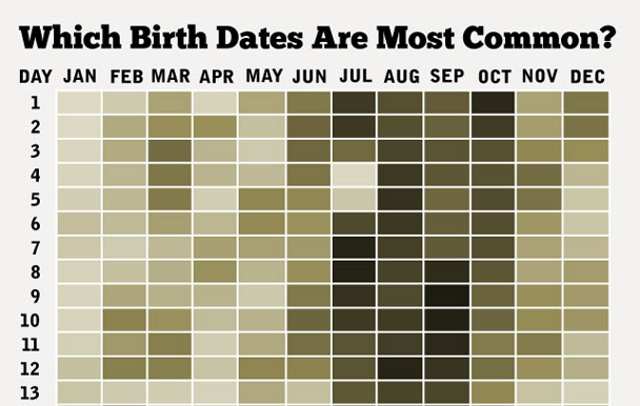
Imagine how revolutionary it was in a time when data was purely numbers and 2D maps. That's when Toussaint Loua stepped it up in 1873 and rocked the world with the first heatmap. It was a total game-changer using a shaded matrix to show data. Just like that, heatmaps were the new must-have accessory for data enthusiasts everywhere!
It all became a lot more interesting back in 1991 when software designer Cormac Kinney was feeling particularly fancy. He dreamed up the term "heatmap" and trademarked it like a boss. He created a tool so cool it could graphically display real-time financial market information (also like a boss!). However, then, in 2003, the company that acquired Kinney's invention got a little too relaxed and let the trademark slip. Whoops!
Fast forward to today, heatmaps have become the equivalent of a magic wand for data visualization and analysis. They're not just for #stuffystatisticians anymore. Marketers, business owners, biologists, geographers and others have jumped on the heatmap bandwagon. These maps can turn raw data into powerful insights faster than you can say "Alohomora". It's opened up a whole new level of possibilities for data analytics.
That’s how heatmap technology evolved and became a revolutionary gem for every business. However, the only way a business can make the best of it is when they understand the right use of this technology. So, let’s understand how it works next.
How Does Heatmap Software Work?
Heatmap Software collects information from various sources and shows a heatmap visual for data analysis. However, how does it work and how is it able to collect every one of your mouse movements on a webpage?

-
Everything starts from the integration of Heatmap Software. This means the software first integrates itself with the website or the app for which it is recording data using JavaScript tracking code. Once the software vendor provides this code, it is added to the website or the platform’s codebase.
-
The next step is to collect data using an integrated codebase. It tracks every little detail, including clicks, taps, scrolling activity and mouse movements, capturing the essence of user behavior like a digital detective. The data is analyzed by the Heatmap Software to uncover insights into user behavior.
-
Next comes the processing aspect. The Heatmap Software takes the collected data and weaves its magic, producing insights in a mesmerizing visual representation of user activity called a heatmap. The heatmap is like a colorful cloak, draped over the website or app, where different shades signify different levels of user engagement and interactions. It's like a visual representation of a user's digital footprint revealing the most captivating areas of the website or app.
-
This step is followed by understanding the user’s patterns and behavior. This information is then used to optimize the website or app, enhancing the user experience and increasing conversions. The heatmap actually acts like a map, leading the way to a better user experience and a brighter future for the business!
- Some heatmap software also includes a feature called session replay, a dazzling show that allows website and app owners to watch recordings of user sessions in action. It's like having a front-row seat to user interactions, providing a wealth of information and in-depth insights into how users interact with their digital assets.
- The heatmap analysis uncovers precious insights that become the compass for the optimization of user journeys. Data-driven decisions are made to improve the website making the design more attractive, the layout more intuitive and the content more tailored.
Now that we know how Heatmap Software works let’s address questions about why we actually use such tools. Here’s the answer to your ‘why’.
Why Do We Need Heatmap Software?

Have you ever thought about if a heatmap solution was used in a retail store, how effective it would be in understanding areas in the store that sees higher footfall? Honestly, it is being done and has helped some stores earn up to 15% more in sales. Here is how this tool helps you:
-
Data Unveiled
Heatmaps are a treasure trove of secrets just waiting to be uncovered. With a little know-how, you'll be able to read between the lines and discover crucial, exciting and usable insights to enhance your user experience!
-
CTA Crusader
If your heatmap lights up like a firework over your call-to-action (CTA) with only a few scattered clicks here and there, it's a surefire indication that your CTA is a true champion! This helps you assess that your CTA is guiding users smoothly down the sales funnel.
-
Emergency Actions
If your heatmap activity is looking a little sparse or if you see a cluster over the "back" button, it's a sign that your site's engagement could use a boost. Get your A/B testing hat on and give your website a facelift!
-
Improved Website Designs
If you catch users futilely clicking on areas of your site that don't respond to clicks, it's a red flag. It could be a pesky broken link or a confusing design that's causing the chaos. Time to whip out the fix-it tools to enhance your user experience!
-
Hold Their Interest
Want to know if your content is holding your users' attention? Use scroll maps to see who's scrolling through your site and tapping the CTA button. Get a glimpse into how long you’re keeping users engaged!
Now you do see how critical this solution is, right? Let’s move on and learn a bit more about the types of Heatmap Software.
What Are The Types Of Heatmap Software?
Heatmaps have been revolutionizing the way we analyze user behavior on websites, apps and other digital interfaces. However, have you ever wondered what kinds of heatmaps are available for use?
.gif.aspx "TechDogs-\"What Are The Types Of Heatmap Software?\" A GIF Of Bruce Wayne")
Is that we’ll simplify it for you! Here are 5 primary types of Heatmap Software that offer different aspects of analytics:
-
Click Heatmap
Click heatmaps show you the hottest areas on your website that reveal where your viewers are clicking. Dark colors indicate the most clicks, while lighter shades show where the love is a little lighter.
-
Scroll Heatmaps
These heatmaps reveal the secret depths of your webpage that show you exactly how far down the page your viewers venture. With a dark-to-light color scale, you'll get a clear picture of where the action (or lack thereof) is happening on your site.
-
Attention Heatmap
An attention heatmap shows where on a website or web page users are spending the most time. This one is represented by darker colors. It helps identify what content is holding the user's attention and what is being ignored.
-
Confetti Maps
Confetti maps are like a party for your website data! They show you where clicks are coming from and which referral sources are sending the most relevant traffic. Each referral segment is represented by a different colored dot (hence the name), like a rainbow of useful user information!
-
Movement Heatmap
These heatmaps show you how visitors move around your website, giving you insights into what they're interested in and what they find not as appealing. Think of it like a virtual dance party and with each visitor leaving a trail of their moves as they groove their way around your site.
That’s pretty cool! Now, let’s see how Heatmap Software benefit your business.
So, How Heatmap Software Is Good For Your Business?
Heatmaps unlock key insights for businesses. That’s something you know. However, the question still stands – what difference does it bring to your business?

- A/B testing surely brings in more clicks and conversions to your business. Experiment with moving website elements or changing their colors based on heatmap insights. You will see an instant impact on your click map. Therefore, heatmap software helps you make data-driven decisions to drive success for your business!
- Heatmap Software helps give your website the best redesign with confidence! Use heatmaps to discover what truly captures your customers' attention and optimize your design for maximum engagement and conversions.
- A heatmap software boosts your business with conversion-friendly decisions by combining easy-to-understand visuals and functionality. Find out if prospects are clicking on the conversion links using scroll and click heatmaps, which are essential for optimizing your website's design.
- Having heatmap tool is the right way to maximize your content marketing efforts as it makes sure your content is actually engaging your audience by confirmation shown on scroll maps to see how much they're reading. Then, strategically place your CTA buttons to convert more visitors into customers.
We bet you are rushing to check which Heatmap Software is the best in the market at this moment – but hold on! Read about its near future to know if it meets your current and future needs.
What Is The Future Of Heatmap Software?
When we talk about the future of heatmap technology, the Heatmap Tools market report by Markets and Research shows how the market is thriving and expanding, one pixel at a time!
According to the study, the Heatmap Software market is sizzling hot and making waves all over the world! For businesses, it will soon become a treasure map, revealing the regions and segments with the greatest potential for finding the treasure – that is higher customer engagement and revenue. The future of heatmap tool is all about harnessing the power of artificial intelligence to provide a more comprehensive understanding of user behavior.
With AI-powered heatmaps, businesses will be able to see a visual representation of not only where users are currently focusing their attention but also where they are likely to focus their attention in the future. Predictive analytics will also show how user behavior may change, helping make better design and content decisions on websites and apps.
Get ready for an exciting adventure into the world of Heatmap Tools!
Conclusion
Heatmap Software is like having superpowers like Batman’s sonar lenses! Imagine knowing exactly where your users are clicking, what they’re avoiding and what they're interested in, just by looking at a colorful map. It's like having X-ray vision in the minds of your target audience! With Heatmap Software, you can optimize your customer interactions for a better user experience and higher conversions.
Frequently Asked Questions
What Is Heatmap Software?
Heatmap Software is a behavior analytics tool utilized by companies to comprehend how visitors interact with webpages, applications, or other interfaces. It tracks various user activities, from interactions with main elements on the page to clicks on CTAs, opt-ins, or any other buttons. By providing insights into user behavior, Heatmap Software enables businesses to optimize their websites or applications for enhanced user experiences and increased conversions.
Where Did Heatmap Software Come From?
The concept of heatmaps originated in the 19th century, evolving into a popular method for visualizing data by the 1900s. The first heatmap, pioneered by Toussaint Loua in 1873, utilized a shaded matrix to represent data, marking a significant advancement in data visualization. In 1991, software designer Cormac Kinney coined the term "heatmap" and developed a tool for real-time financial market information. Since then, heatmaps have become invaluable tools for various industries, including marketing and business analytics, revolutionizing how data is analyzed and insights are derived.
How Does Heatmap Software Work?
Heatmap Software integrates with websites or applications using JavaScript tracking code, allowing it to collect data on user interactions. It tracks clicks, taps, scrolling activity, and mouse movements to capture user behavior comprehensively. The collected data is then analyzed to generate visual representations called heatmaps, which highlight areas of user engagement and interaction intensity. Heatmap analysis provides valuable insights into user behavior, enabling businesses to optimize their digital assets for improved user experiences and conversions.
Thu, Mar 16, 2023

Enjoyed what you read? Great news – there’s a lot more to explore!
Dive into our content repository of the latest tech news, a diverse range of articles spanning introductory guides, product reviews, trends and more, along with engaging interviews, up-to-date AI blogs and hilarious tech memes!
Also explore our collection of branded insights via informative white papers, enlightening case studies, in-depth reports, educational videos and exciting events and webinars from leading global brands.
Head to the TechDogs homepage to Know Your World of technology today!
Disclaimer - Reference to any specific product, software or entity does not constitute an endorsement or recommendation by TechDogs nor should any data or content published be relied upon. The views expressed by TechDogs' members and guests are their own and their appearance on our site does not imply an endorsement of them or any entity they represent. Views and opinions expressed by TechDogs' Authors are those of the Authors and do not necessarily reflect the view of TechDogs or any of its officials. While we aim to provide valuable and helpful information, some content on TechDogs' site may not have been thoroughly reviewed for every detail or aspect. We encourage users to verify any information independently where necessary.
Loading comments...